
CodeSpells! A Kickstarter to make a difference. @sesperu @codespells #codespells
Posted: September 9, 2014 Filed under: Education, Opinion | Tags: advocacy, blockly, blogging, Code Spells, codespells, community, education, educational problem, educational research, games, Generation Why, higher education, in the student's head, learning, principles of design, resources, Sarah Esper, Stephen Foster, student perspective, students, teaching, teaching approaches, thinking, tools, UCSD, universal principles of design Leave a commentI first met Sarah Esper a few years ago when she was demonstrating the earlier work in her PhD project with Stephen Foster on CodeSpells, a game-based project to start kids coding. In a pretty enjoyable fantasy game environment, you’d code up spells to make things happen and, along the way, learn a lot about coding. Their team has grown and things have come a long way since then for CodeSpells, and they’re trying to take it from its research roots into something that can be used to teach coding on a much larger scale. They now have a Kickstarter out, which I’m backing (full disclosure), to get the funds they need to take things to that next level.
Teaching kids to code is hard. Teaching adults to code can be harder. There’s a big divide these days between the role of user and creator in the computing world and, while we have growing literary in use, we still have a long way to go to get more and more people creating. The future will be programmed and it is, honestly, a new form of literacy that our children will benefit from.
If you’re one of my readers who likes the idea of new approaches to education, check this out. If you’re an old-timey Multi-User Dungeon/Shared Hallucination person like me, this is the creative stuff we used to be able to do on-line, but for everyone and with cool graphics in a multi-player setting. If you have kids, and you like the idea of them participating fully in the digital future, please check this out.
To borrow heavily from their page, 60% of jobs in science, technology,engineering and maths are computing jobs but AP Computer Science is only taught at 5% of schools. We have a giant shortfall of software people coming up and this will be an ugly crash when it comes because all of the nice things we have become used to in the computing side will slow down and, in some cases, pretty much stop. Invest in the future!
I have no connection to the project apart from being a huge supporter of Sarah’s drive and vision and someone who would really like to see this project succeed. Please go and check it out!

The Earth Magic Sphere image, from the Kickstarter page.
ITiCSE 2014, Day 3, Final Session, “CS Ed Research”, #ITiCSE2014 #ITiCSE
Posted: June 26, 2014 Filed under: Education | Tags: curriculum, education, educational problem, educational research, higher education, ITiCSE, ITiCSE2014, Paul Denny, programming, reflection, Scratch, student perspective, syntax errors, teaching, teaching approaches, universal principles of design, vygotsky, Zone of proximal development Leave a commentThe first paper, in the final session, was the “Effect of a 2-week Scratch Intervention in CS1 on Learners with Varying Prior Knowledge”, presented by Shitanshu Mirha, from IIT Bombay. The CS1 course context is a single programming course for all freshmen engineer students, thus it has to work for novice and advanced learners. It’s the usual problem: novices get daunted and advanced learners get bored. (We had this problem in the past.) The proposed solution is to use Scratch, because it’s low-floor (easy to get started), high-ceiling (can build complex projects) and wide-walls (applies to a wide variety of topics and themes). Thus it should work for both novice and advanced learners.
The theoretical underpinning is that novice learners reach cognitive overload while trying to learn techniques for programming and a language at the same time. One way to reduce cognitive load is to use visual programming environments such as Scratch. For advanced learners, Scratch can provide a sufficiently challenging set of learning material. From the perspective of Flow theory, students need to reach equilibrium between challenge level and perceived skill.
The research goal was to investigate the impact of a two-week intervention in a college course that will transition to C++. What would novices learn in terms of concepts and C++ transition? What would advanced students learn? What was the overall impact on students?
The cohort was 450 students, no CS majors, with a variety of advanced and novice learners, with a course objective of teaching programming in C++ across 14 weeks. The Scratch intervention took place over the first four weeks in terms of teaching and assessment. Novice scaffolding was achieved by ramping up over the teaching time. Engagement for advanced learners was achieved by starting the project early (second week). Students were assessed by quizzes, midterms and project production, with very high quality projects being demonstrated as Hall of Fame projects.
Students were also asked to generate questions on what they learned and these could be used for other students to practice with. A survey was given to determine student perception of usefulness of the Scratch approach.
The results for Novices were presented. While the Novices were able to catch up in basic Scratch comprehension (predict output and debug code), this didn’t translate into writing code in Scratch or debugging programs in C++. For question generation, Novices were comparable to advanced learners in terms of number of questions generated on sequences, conditionals and data. For threads, events and operators, Novices generated more questions – although I’m not sure I see the link that demonstrates that they definitely understood the material. Unsurprisingly, given the writing code results, Novices were weaker in loops and similar programming constructs. More than 53% of Novices though the Scratch framing was useful.
In terms of Advanced learner engagement, there were more Advanced projects generated. Unsurprisingly, Advanced projects were far more complicated. (I missed something about Most-Loved projects here. Clarification in the comments please!) I don’t really see how this measures engagement – it may just be measuring the greater experience.
Summarising, Scratch seemed to help Novices but not with actual coding or working with C++, but it was useful for basic concepts. The author claims that the larger complexity of Advanced user projects shows increased engagement but I don’t believe that they’ve presented enough here to show that. The sting in the tail is that the Scratch intervention did not help the Novices catch up to the Advanced users for the type of programming questions that they would see in the exam – hence, you really have to question its utility.
The next paper is “Enhancing Syntax Error Messages Appears Ineffectual” presented by Paul Denny, from The University of Auckland. Apparently we could only have one of Paul or Andrew Luxton-Reilly, so it would be churlish to say anything other than hooray for Paul! (Those in the room will understand this. Sorry we missed you, Andrew! Catch up soon.) Paul described this as the least impressive title in the conference but that’s just what science is sometimes.
Java is the teaching language at Auckland, about to switch to Python, which means no fancy IDEs like Scratch or Greenfoot. Paul started by discussing a Java statement with a syntax error in it, which gave two different (but equally unhelpful) error messages for the same error.
if (a < 0) || (a > 100)
  error=true;

// The error is in the top line because there should be surrounding parentheses around conditions
// One compiler will report that a ';' is required at the ||, which doesn't solve the right problem.
// The other compiler says that another if statement is required at the ||
// Both of these are unhelpful - as well as being wrong. It wasn't what we intended.
The conclusion (given early) is simple: enhancing the error messages with a controlled empirical study found no significant effect. This work came from thinking about an early programming exercise that was quite straightforward but seemed to came students a lot of grief. For those who don’t know, programs won’t run until we fix the structural problems in how we put the program elements together: syntax errors have to be fixed before the program will run. Until the program runs, we get no useful feedback, just (often cryptic) error messages from the compiler. Students will give up if they don’t make progress in a reasonable interval and a lack of feedback is very disheartening.
The hypothesis was that providing more useful error messages for syntax errors would “help” users, help being hard to quantify. These messages should be:
- useful: simple language, informal language and targeting errors that are common in practice. Also providing example code to guide students.
- helpful: reduce the number of non-compiling submissions in total, reduce number of consecutive non-compiling submissions AND reduce the number of attempts to resolve a specific error.
In related work, Kummerfeld and Kay (ACE 2003), “The neglected battle fields of Syntax Errors”, provided a web-based reference guide to search for the error text and then get some examples. (These days, we’d probably call this Stack Overflow. 🙂 ) Flowers, Carver and Jackson, 2004, developed Gauntlet to provide more informal error messages with user-friendly feedback and humour. The paper was published in Frontiers in Education, 2004, “Empowering Students and Building Confidence in Novice Programmers Through Gauntlet.” The next aspect of related work was from Tom Schorsch, SIGCSE 1995, with CAP, making specific corrections in an environment. Warren Toomey modified BlueJ to change the error subsystem but there’s no apparent published work on this. The final two were Dy and Rodrigo, Koli Calling 2010, with a detector for non-literal Java errors and Debugging Tutor: Preliminary evaluation, by Carter and Blank, KCSC, January 2014.
The work done by the authors was in CodeWrite (written up in SIGCSE 2011 and ITiCSE 2011, both under Denny et al). All students submit non-compiling code frequently. Maybe better feedback will help and influence existing systems such as Nifty reflections (cloud bat) and CloudCoder. In the study, student had 10 problems they could choose from, with a method, description and return result. The students were split in an A/B test, where half saw raw feedback and half saw the enhanced message. The team built an error recogniser that analysed over 12,000 submissions with syntax errors from a 2012 course and the raw compiler message identified errors 78% of the time. (“All Syntax Errors are Not Equal”, ITiCSE 2012). In other cases, static analysis was used to work out what the error was. Eventually, 92% of the errors were classifiable from the 2012 dataset. Anything not in that group was shown as raw error message to the student.
In the randomised controlled experiment, 83 students had to complete the 10 exercises (worth 1% each), using the measures of:
- number of consecutive non-compiing submissions for each exercise
- Total number of non-compiling submissions
- … and others.
Do students even read the error messages? This would explain the lack of impact. However, examining student code change there appears to be a response to the error messages received, although this can be a slow and piecemeal approach. There was a difference between the groups, but it wasn’t significant, because there was a 17% reduction in non-compiling submissions.
I find this very interesting because the lack of significance is slightly unexpected, given that increased expressiveness and ease of reading should make it easier for people to find errors, especially with the provision of examples. I’m not sure that this is the last word on this (and I’m certainly not saying the authors are wrong because this work is very rigorous) but I wonder what we could be measuring to nail this one down into the coffin.
The final talk was “A Qualitative Think-Aloud Study of Novice Programmers’ Code Writing Strategies”, which was presented by Tony Clear, on behalf of the authors. The aim of the work was to move beyond the notion of levels of development and attempt to explore the process of learning, building on the notion of schemas and plans. Assimilation (using existing schemas to understand new information) and accommodation (new information won’t fit so we change our schema) are common themes in psychology of learning.
We’re really not sure how novice programmers construct new knowledge and we don’t fully understand the cognitive process. We do know that learning to program is often perceived as hard. (Shh, don’t tell anyone.) At early stages, movie programmers have very few schemas to draw on, their knowledge is fragile and the cognitive load is very high.
Woohoo, Vygotsky reference to the Zone of Proximal Development – there are things students know, things that can learn with help, and then the stuff beyond that. Perkins talked about attitudinal factors – movers, tinkerers and stoppers. Stoppers stop and give up in the face of difficulty, tinkers fiddle until it works and movers actually make good progress and know what’s going on. The final aspect of methodology was inductive theory construction, while I’ll let you look up.
Think-aloud protocol requires the student to clearly vocalise what they were thinking about as they completed computation tasks on a computer, using retrospective interviews to address those points in the videos where silence, incomprehensibility or confused articulation made interpreting the result impossible. The scaffolding involve tutoring, task performance and follow-up. The programming tasks were in a virtual world-based pogromming environment to solve tasks of increasing difficulty.
How did they progress? Jacquie uses the term redirection to mean that the student has been directed to re-examine their work, but is not given any additional information. They’re just asked to reconsider what they’ve done. Some students may need a spur and then they’re fine. We saw some examples of students showing their different progression through the course.
Jacquie has added a new category, PLANNERS, which indicates that we can go beyond the Movers to explain the kind of behaviour we see in advanced students in the top quartile. Movers who stretch themselves can become planners if they can make it into the Zone of Proximal Development and, with assistance, develop their knowledge beyond what they’d be capable of by themselves. The More Competent Other plays a significant role in helping people to move up to the next level.
Full marks to Tony. Presenting someone else’s work is very challenging and you’d have to be a seasoned traveller to even reasonably consider it! (It was very nice to see the lead author recognising that in the final slide!)
ITiCSE 2014, Day 3, Session 7B, Peer Instruction, #ITiCSE2014 #ITiCSE
Posted: June 25, 2014 Filed under: Education | Tags: community, computer science education, curriculum, design, education, educational problem, educational research, flipped classroom, higher education, in the student's head, inverted classroom, ITiCSE, ITiCSE 2014, learning, peer instruction, teaching, teaching approaches, thinking Leave a commentThe first talk was “Peer Instruction: a Link to the Exam” presented by Daniel Zingaro from University of Toronto. Peer Instruction (PI) is an active learning pedagogy developed for physics and now heavily used in computing. Students complete a reading quiz prior to class and teachers use multiple-choice quizzes to assess knowledge. (You can look this one up in a number of places but I’ve discussed it here before a bit.) There’s a lot of research that shows gains between individual and group vote, with enduring improvements in student learning. (We can use isomorphic questions to reduce the likelihood of copying.) Both students and instructors value the learning.
PI appears to demonstrate improved learning outcomes on the final exam grades, as well as perceived depth of learning. (Couple of studies here from Beth Simon et al, and Daniel himself, checking Beth’s results.) But what leads to this improved outcome? The peer discussion. The class wide discussion? Both? If one part isn’t useful then we can adapt it to make it more useful to Computer Scientists. Daniel is going to use isomorphic questions to investigate relationships between PI components and final exam grades.
The isomorphic questions test the same concept with different questions, where if they get the first one right, we hope that they get the second one right – and if people learn how to do one, then that knowledge flows on to the other. (The example given was of loop complexity in nested loops depending on different variables.)
Daniel has two question modes in this experiment, which are slightly different. Both modes include the PI components, but the location of the isomorphic questions vary between the two approaches in the second question. In the Peer ℗ mode, the isomorphic question comes directly after the group vote and the second mode (Combined – C), the Q2 isomorphic questions occur direct after the instructor has had a chance to influence the class.
Are the questions really isomorphic and of the same difficulty? An external ranker was used to verity this and then the question pairs and mode were randomised. The difficulty of the questions was found to be statistically equivalent, based on the percentage of Q1 that were found to be correct.
Daniel had two hypotheses. Firstly, that peer scores will correlate to final exam scores. Secondly, that combined scores will also correlate with final exam scores, but the correlation should be stronger than for Peer, with the Combined questions representing learning from the full PI cycle. In terms of the final exam, there were three measures of the final exam grades: total exam score, score on the tracing question (similar to PI questions) and score on a code-writing question (very different to PI questions).
The implementation was a CS1 course with 3 lectures/week, with reading quizzes worthy 4% submitted prior to each lecture, clicker responses worth 5%, where the lectures on average contained three PI cycles- one cycle per lecture contained the follow-up isomorphic question. Multiple regression was used to test relationships between PI and final exam scores.
All of the results were statistically significant. For code-tracing, hat students know before exam explains 13% of their scores in the final exam. With the peer questions, it goes up to 16%. With combined as well, it goes up to 19%. Is this practically significant? Daniel raised this question because it doesn’t rise very much.
In terms of code writing, Baseline is 16%, + Peers is 22% and +Combined is 25%, so we’re starting to see more contribution from peers than instructor in this case. Are we measuring the different difficulty of a problem that peers couldn’t correct, which is why the instructor does less?
Overall? Baseline 21%, Peer 30% and then Combined is 34%. (Any questions about the stats, please read the paper. 🙂 )
Maybe adding combined questions to peer questions increases our predictive accuracy, just because we’re adding more data and this being able to produce a better model?
In discussion, PI performance related to final exam scores (as expected). Peer learning alone is important and the instructor-led discussion is important, over and above peer learning. This validates the role of the instructor in a “student-centred” classroom. Given that PI uses MCQs, we might expect it to only correlate with code-tracing but it does appear to correlate with code-writing problems as well – there may be deep conceptual similarities between PI questions and programming skills. But would the students that learned from PI also the students that would have learned from any other form of instruction? Still an open question and there’s a lot of ongoing work still to do.
The next paper was “Comparing Outcomes in Inverted and Traditional CS1” presented by Diane Horton from U Toronto. I’ve been discussing early intervention and student attendance issues in inverted/hybrid courses with Jennifer Campbell and Michelle Craig, also from U Toronto and also on this paper, as part of an attempt to get some good answers so I’d just come straight out of a lunch, discussing inverted classrooms and their outcomes. (Again, this is why we come to conferences – much of the value is in the meetings and discussion that are just so hard to have when you’re doing your day job or fitting a Skype meeting into the wee small hours to bridge the continental time gap.)
As a reminder, in inverted teaching, some or all of the material is delivered outside the classroom. Work typically done as homework is done in the lecture with the help of instructor or TAs. There were three research questions. Would the inverted offerings have better outcomes? Would inverted teaching affect students’ behaviour or experience? Would particular subgroups respond differently, especially English-language learners and beginner programmers?
The CS1 course at Toronto is a 12 week course in Python, objects-early, classes-late, with most students in 1st year and less than half looking to major in CS. The lectures are roughly 200 students, with 5 of these lecture sections.
Before the lecture, students prepared by watching videos, from the instructors, mostly screencasts of live programming with voice over, credit for attempting quizzes embedded in videos is 0.5% per week. (It’s scary how small that fraction has to be and really rather sad, from a behavioural perspective.)
During the lecture, the instructors used a worked example and students worked on worksheet-based exercises for most of the lectures, with assistance, solo or in pairs. This was a responsive teaching approach because the instructor could draw the class together as required. There was no mark reward or penalty that depended on attendance. If you were solid on the material, it was okay to miss the lecture. The mark scheme reflected some marks for lecture preparation with an increased number of online exercises and decreased weighting on labs.
The inverted CS1 course had gone well in the pilot in January 2013, which was published in a peer at SIGCSE ’14, but it was hard to compare this with the previous class as the make-up of the cohort varies from September to January courses. The study was run again in a more similar cohort in September 2014. The data presented here is for a similar cohort with a high overlap of instructors, compared the traditional offering.
For the present study, there were pre- and post-course surveys about attitude and behaviour, competed on-paper in the lecture. Weekly lecture attendance counts were made and standard university course valuations collected. In terms of attendance, the inverted pilot was the lowest, but the inverted class had lower attendance most of the time – an effect that we have also seen under some circumstances and are still thinking about. Interestingly, students thought that the inverted lectures weren’t seen as being as useful as face-to-face lectures but the online support materials were seen to be very helpful. As a package, this seems to be an overall positive experience.
The hypothesis was that students in the inverted offering would self-report a higher quality of learning experience and greater enjoyment but this wasn’t supported in the data, nor was it for beginners in particular. However, when asked if they wanted more inverted courses, there was a very strong positive response to this question.
The authors expected that beginners would benefit more because they need more helps and the gap between beginners and experiences students would reduce – this wasn’t supported by the data. Also, there was no reduction of gaps for English language learners, either.
Would the inverted course help people stay on and pass the course? Well, however success was defined, the pass rate was remarkably consistent, even when the beginners were isolated. However, it does appear that the overall level of knowledge, as measured by the final exam grades, actually improved in the inverted offerings, across two exams of similar difficult, with a jump from an average grade of 66% to 74% between the terms. Is this just due to the inverted teaching?
Maybe students learned more in the inverted offering because they spent more time on task? Based on self-reported student time, this doesn’t appear to be true. Maybe the beginners got killed off early to reduce their numbers and raise the mark? No, the drop rates among beginners were the same. It appears that the 8 percentage point increase may be related to the inverted mode, although, obviously, more work is required.
Is it worth it? They used no additional TA resources but the development time was enormous. You may not be ready for this investment. There are other options, you don’t need to use videos and you can use pre-existing materials to reduce costs.
Future work involves looking at dropping patterns – who drops when – and student who stumble and recover. They’re also looking at a full online CS1 course for course credit.
The final talk was on “Making Group Processes Explicit to Students: A Case for Justice” presented by Ville Isomöttönen. Project courses have a very long history in Computer Science, as capstones, using authentic customer projects, and the intention is to provide a realistic experience. (Editor’s note: It’s worth noting that some of this may be coming from the “We got punished like this so you can be too.”) What do students actually learn from this? Are they learning what we want them to learn or they are learning something very different and, potentially, much darker?
(This sounds like the kind of philosophical paper I’d give, let’s see where it goes! 🙂 )
If we have tertiary students, why can’t we just place them into a workplace for work experience? They’re adults – maybe we can separate this aspect and the pedagogue. The author’s study wants to look at how to promote conceptual learning in the response of realistic course work. Parker (1999) proposes that students are spending their effort of building wiring products, rather than actually learning about and reflecting upon the professional issues we consider important. The conjecture is that just because the situation is realistic doesn’t mean that the conceptual learning is happening as we intended.
The study is based around a fairly straight forward project-based learning structure, but had a Pass/Fail grade, with no distinction grading as far as I could tell. The teaching was baed on weekly group discussions, with self/peer evaluations, also housed in a group situation, and technical supervision offered by teaching assistant. Throughout the course, students are prompted to think about their operation at a conceptual level. Hmm. I’m not sure what the speaker means by this as, without a very detailed description of what is going on, this could have many different implementations.
We then cut to a diagram of justice conceptualised – I may have missed something as I’m not quite sure how this sits with the group work. I can’t find the diagram online but it involves participation, involving and negotiating with others – fused together as the skill of justice. This sits above statuses, norms and roles. Some of the related work deals with fairness (Richards 2009) as a key attribute of successful group work, Clear 2002 uses it in diagnostic technique, and Pieterse and Thompson 2010 mentioned ‘social loafers’ and ‘diligent isolates’.
I’m dreadfully sorry, dear reader, but I’m not following this properly so this may be a bit sketchy. Go and read the paper and I’ll try to get this together. Everyone else in the room appears to be getting this so I may just be tired or struggling with my (not very good) hearing and someone who is speaking rather quietly.
The underlying pedagogy comes from the social realist mindset (Moore,2000, Maton and Moore, 2010) and “avoids the dilemma between constructivist relativism and positivist absolutism”. We should also look at the Integrative Pedagogy (Tynjana (sp)), where the speaker feels that what they are describing is a realist version of this.
The course was surveyed with a preliminary small study (N=21/26, which is curious. Which one is it? Ah, 21 out of 26 enrolled, there we go.). The survey questions were… rather loose and very open to influence, unfortunately, from my quick glance at them but I will have to read the original paper.
Justice is a difficult topic to address, especially where it’s reified as a professional skill that can be developed, and discussing the notion of justice in terms of the ways that a group can work together fairly is very important. I suppose I’m not 100% convinced how much is added in this context through the use of a new term that is an apparent parent to communication and negotiation, with the desired outcome of fairness, because the amalgamation seems to obscure the individual components that would be improved upon to return to a fair state. The very small study, and a small survey, is a valid approach for a case study or phenomenographic approach, but I get the feeling that I was seeing a grounded theory argument. We do have to expose our desired processes to students if we’re going to achieve cognitive apprenticeship and there is a great deal of tension between industrial practice and key concepts, so this is a very interesting area to work in. I completely agree with the speaker that our heavy technical focus often precludes discussions of the empathic, philosophical and intangible, but I’m yet to see how this approach contributes.
The discussions mentioned as important are very important but group reports and discussion are a built-in part of many SE process models so I wonder how the justice theme amplifies this aspects. Again, getting students to engage in a dialogue that they do not expect to have in CS can be very challenging but we could be discussing issues such as critical thinking and ethics, which are often equally alien and orthogonal to the technical, without forming a compound concept that potentially obscures the underlying component mechanisms.
Simon asked a very good question: you didn’t present anything that showed a problem where the students would have needed the concept of justice. Apparently, this is in the writings that are yet to be analysed. The answer to the question ended up as an unlabelled graph on the blackboard which was focused on a skill difference with more experienced peers. I still can’t see how justice ties into this. I have to go and get my hearing checked.
ITiCSE 2014, Day 3, Session 6A, “Digital Fluency”, #ITiCSE2014 #ITiCSE
Posted: June 25, 2014 Filed under: Education | Tags: ALICE, arm the princess, Bologna model, competency, competency-based assessment, computational thinking, computer science education, Duke, education, educational problem, educational research, empowering minorities, empowering women, higher education, ITiCSE, ITiCSE 2014, key competencies, learning, middle school, non-normative approaches, pattern analysis, principles of design, reflection, teaching, thinking, tools, women in computing Leave a comment
I’m at the Ångstrom Laboratory of Uppsala so this portrait hangs in the main hall. Hi, Anders!
The first paper was “A Methodological Approach to Key Competences in Informatics”, presented by Christina Dörge. The motivation for this study is moving educational standards from input-oriented approaches to output-oriented approaches – how students will use what you teach them in later life. Key competencies are important but what are they? What are the definitions, terms and real meaning of the words “key competencies”? A certificate of a certain grade or qualification doesn’t actually reflect true competency is many regards. (Bologna focuses on competencies but what do really mean?) Competencies also vary across different disciplines as skills are used differently in different areas – can we develop a non-normative approach to this?
The author discussed Qualitative Content Analysis (QCA) to look at different educational methods in the German educational system: hardware-oriented approaches, algorithm-oriented, application-oriented, user-oriented, information-oriented and, finally, system-oriented. The paradigm of teaching has shifted a lot over time (including the idea-oriented approach which is subsumed in system-oriented approaches). Looking across the development of the paradigms and trying to work out which categories developed requires a coding system over a review of textbooks in the field. If new competencies were added, then they were included in the category system and the coding started again. The resulting material could be referred to as “Possible candidates of Competencies in Informatics”, but those that are found in all of the previous approaches should be included as Competencies in Informatics. What about the key ones? Which of these are found in every part of informatics: theoretical, technical, practical and applied (under the German partitioning)? A key competency should be fundamental and ubiquitous.
The most important key competencies, by ranking, was algorithmic thinking, followed by design thinking, then analytic thinking (must look up the subtle difference here). (The paper contains all of the details) How can we gain competencies, especially these key ones, outside of a normative model that we have to apply to all contexts? We would like to be able to build on competencies, regardless of entry point, but taking into account prior learning so that we can build to a professional end point, regardless of starting point. What do we want to teach in the universities and to what degree?
The author finished on this point and it’s a good question: if we view our progression in terms of competency then how we can use these as building blocks to higher-level competencies? THis will help us in designing pre-requsitites and entry and exit points for all of our educational design.
The next talk was “Weaving Computing into all Middle School Disciplines”, presented by Susan Rodger from Duke. There were a lot of co-authors who were undergraduates (always good to see). The motivation for this project was there are problems with CS in the K-12 grades. It’s not taught in many schools and definitely missing in many high schools – not all Unis teach CS (?!?). Students don’t actually know what it is (the classic CS identify problem). There are also under-represented groups (women and minorities). Why should we teach it? 21st century skills, rewordings and many useful skills – from NCWIT.org.
Schools are already content-heavy so how do we convince people to add new courses? We can’t really so how about trying to weave it in to the existing project framework. Instead of doing a poster or a PowerPoint prevention, why not provide an animations that’s interactive in some way and that will involve computing. One way to achieve this is to use Alice, creating interactive stories or games, learning programming and computation concepts in a drag-and-drop code approach. Why Alice? There are many other good tools (Greenfoot, Lego, Scratch, etc) – well, it’s drag-and-drop, story-based and works well for women. The introductory Alice course in 2005 started to attract more women and now the class is more than 50% women. However, many people couldn’t come in because they didn’t have the prerequisites so the initiative moved out to 4th-6th grade to develop these skills earlier. Alice Virtual Worlds excited kids about computing, even at the younger ages.
The course “Adventures in Alice Programming” is aimed at grades 5-12 as Outreach, without having to use computing teachers (which would be a major restriction). There are 2-week teacher workshops where, initially, the teachers are taught Alice for a week, then the following week they develop lesson plans. There’s a one-week follow-up workshop the following summer. This initiative is funded until Summer, 2015, and has been run since 2008. There are sites: Durham, Charleston and Southern California. The teachers coming in are from a variety of disciplines.
How is this used on middle and high schools by teachers? Demonstrations, examples, interactive quizzes and make worlds for students to view. The students may be able to undertake projects, take and build quizzes, view and answer questions about a world, and the older the student, the more they can do.
Recruitment of teachers has been interesting. Starting from mailing lists and asking the teachers who come, the advertising has spread out across other conferences. It really helps to give them education credits and hours – but if we’re going to pay people to do this, how much do we need to pay? In the first workshop, paying $500 got a lot of teachers (some of whom were interested in Alice). The next workshop, they got gas money ($50/week) and this reduced the number down to the more interested teachers.
There are a lot of curriculum materials available for free (over 90 tutorials) with getting-started material as a one-hour tutorial showing basic set-up, placing objects, camera views and so on. There are also longer tutorials over several different stories. (Editor’s note: could we get away from the Princess/Dragon motif? The Princess says “Help!” and waits there to be rescued and then says “My Sweet Prince. I am saved.” Can we please arm the Princess or save the Knight?) There are also tutorial topics on inheritance, lists and parameter usage. The presenter demonstrated a lot of different things you can do with Alice, including book reports and tying Alice animations into the real world – such as boat trips which didn’t occur.
It was weird looking at the examples, and I’m not sure if it was just because of the gender of the authors, but the kitchen example in cooking with Spanish language instruction used female characters, the Princess/Dragon had a woman in a very passive role and the adventure game example had a male character standing in the boat. It was a small sample of the materials so I’m assuming that this was just a coincidence for the time being or it reflects the gender of the creator. Hmm. Another example and this time the Punnett Squares example has a grey-haired male scientist standing there. Oh dear.
Moving on, lots of helper objects are available for you to use if you’re a teacher to save on your development time which is really handy if you want to get things going quickly.
Finally, on discussing the impact, one 200 teachers have attend the workshops since 2008, who have then go on to teach 2900 students (over 2012-2013). From Google Analytics, over 20,000 users have accessed the materials. Also, a number of small outreach activities, Alice for an hour, have been run across a range of schools.
The final talk in this session was “Early validation of Computational Thinking Pattern Analysis”, presented by Hilarie Nickerson, from University of Colorado at Boulder. Computational thinking is important and, in the US, there have been both scope and pedagogy discussions, as well as instructional standards. We don’t have as much teacher education as we’d like. Assuming that we want the students to understand it, how can we help the teachers? Scalable Game Design integrates game and simulation design into public school curricula. The intention is to broaden participation for all kinds of schools as after-scjool classes had identified a lot of differences in the groups.
What’s the expectation of computational thinking? Administrators and industry want us to be able to take game knowledge and potentially use it for scientific simulation. A good game of a piece of ocean is also a predator-prey model, after all. Does it work? Well, it’s spread across a wide range of areas and communities, with more than 10,000 students (and a lot of different frogger games). Do they like it? There’s a perception that programming is cognitively hard and boring (on the congnitive/affective graph ranging from easy-hard/exciting-boring) We want it to be easy and exciting. We can make it easier with syntactic support and semantic support but making it exciting requires the students to feel ownership and to be able to express their creativity. And now they’re looking at the zone of proximal flow, which I’ve written about here. It’s good see this working in a project first, principles first model for these authors. (Here’s that picture again)

Figure from A. Repenning, “Programming Goes to School”, CACM, 55, 5, May, 2012.
The results? The study spanned 10,000 students, 45% girls and 55% boys (pretty good numbers!), 48% underrepresented, with some middle schools exposing 350 students per year. The motivation starts by making things achievable but challenging – starting from 2D basics and moving up to more sophisticated 3D games. For those who wish to continue: 74% boys, 64% girls and 69% of minority students want to continue. There are other aspects that can raise motivation.
What about the issue of Computing Computational Thinking? The authors have created a Computational Thinking Pattern Analysis (CTPA) instrument that can track student learning trajectories and outcomes. Guided discovery, as a pedagogy, is very effective in raising motivation for both genders, where direct instruction is far less effective for girls (and is also less effective for boys).
How do we validate this? There are several computational thinking patterns grouped using latent semantic analysis. One of the simpler patterns for a game is the pair generation and absorption where we add things to the game world (trucks in Frogger or fish in predator/prey) and then remove them (truck gets off the screen/fish gets eaten). We also need collision detection. Measuring skill development across these skills will allow you to measure it in comparison to the tutorial and to other students. What does CTPA actually measure? The presence of code patterns that corresponded to computational thinking constructs suggest student skill with computational thinking (but doesn’t prove it) and is different from measuring learning. The graphs produced from this can be represented as a single number, which is used for validation. (See paper for the calculation!)
This has been running for two years now, with 39 student grades for 136 games, with the two human graders shown to have good inter-rater consistency. Frogger was not very heavily correlated (Spearman rank) but Sokoban, Centipede and the Sims weren’t bad, and removing design aspects of rubrics may improve this.
Was their predictive validity in the project? Did the CTPA correlate with the skill score of the final game produced? Yes, it appears to be significant although this is early work. CTPA does appear to be cabal of measuring CT patterns in code that correlate with human skill development. Future work on this includes the refinement of CTPA by dealing with the issue of non-orthogonal constructs (collisions that include generative and absorptive aspects), using more information about the rules and examining alternative calculations. The group are also working not oils for teachers, including REACT (real-time visualisations for progress assessment) and recommend possible skill trajectories based on their skill progression.
ITiCSE 2014, Day 3, Keynote, “Meeting the Future Challenges of Education and Digitization”, #ITiCSE2014 #ITiCSE @jangulliksen
Posted: June 25, 2014 Filed under: Education | Tags: advocacy, community, computer science education, digital learning, digitisation, education, educational problem, educational research, higher education, ITiCSE, ITiCSE 2014, Jan Gulliksen, learning, measurement, Professor Gulliksen, teaching, teaching approaches, thinking Leave a commentThis keynote was presented by the distinguished Professor Jan Gulliksen (@jangulliksen) of KTH. He started with two strange things. He asked for a volunteer and, of course, Simon put his hand up. Jan then asked Simon to act as a support department to seek help with putting on a jacket. Simon was facing the other way so had to try and explain to Jan the detailed process of orientating and identifying the various aspects of the jacket in order. (Simon is an exceedingly thoughtful and methodical person so he had a far greater degree of success than many of us would.) We were going to return to this. The second ‘strange thing’ was a video of President Obama speaking on Computer Science. Professor Gulliksen asked us how often a world leader would speak to a discipline community about the importance of their discipline. He noted that, in his own country, there was very little discussion in the political parties on Computer Science and IT. He noted that Chancellor Merkel had expressed a very surprising position, in response to the video, as the Internet being ‘uncharted territory‘.
Professor Gulliksen then introduced himself as the Dean of the School of Computer Science and communication in KTH, Stockholm, but he had 25 years of previous experience at Uppsala. Within this area, he had more than 20 years of experience working with the introduction of user-centred systems in public organisations. He showed two pictures, over 20 years apart, which showed how little the modern workspace has changed in that time, except that the number of post-it colours have increased! He has a great deal of interest in how we can improve the design for all users. Currently, he is looking at IT for mental and psychological disabilities, finder by Vinnova and PTS, which is not a widely explored area and can be of great help to homeless people. His team have been running workshops with these people to determine the possible impact of increased IT access – which included giving them money to come to the workshop. But they didn’t come. So they sent railway tickets. But they still didn’t come. But when they used a mentor to talk them through getting up, getting dressed, going to the station – then they came. (Interesting reflection point for all teachers here.) Difficult to work within the Swedish social security system because the homeless can be quite paranoid about revealing their data and it can be hard to work with people who have no address, just a mobile number. This is, however, a place where our efforts can have great societal impact.
Professor Gulliksen asks his PhD students: What is really your objective with this research? And he then gives them three options: change the world, contribute new knowledge or you want your PhD. The first time he asked this in Sweden, the student started sweating and asked if they could have a fourth option. (Yes, but your fourth is probably one of the three.) The student then said that they wanted to change the world, but on thinking about it (what have you done), wanted to change to contribute new knowledge, then thought about it some more (ok, but what have you done), after further questioning it devolved to “I think I want my PhD”. All of these answers can be fine but you have to actually achieve your purpose.
Our biggest impact is on the people that we produce, in terms of our contribution to the generation and dissemination of knowledge. Jan wants to know how we can be more aware of this role in society. How can we improve society through IT? This led to the committee for Digitisation, 2012-2015: Sweden shall be the best country in the world when it comes to using the opportunities for digitisation. Sweden produced “ICT for Everyone”, a Digital Agenda for Sweden, which preceded the European initiative. There are 170 different things to be achieved with IT politics but less than a handful of these have not been met since October, 2011. As a researcher, Professor Gulliksen had to come to an agreement with the minister to ensure that his academic freedom, to speak truth to power, would not be overly infringed – even though he was Norwegian. (Bit of Nordic humour here, which some of you may not get.)
The goal was that Sweden would be the best country in the world when it came to seizing these opportunities. That’s a modest goal (The speaker is a very funny man) but how do we actually quantify this? The main tasks for the commission were to develop the action plan, analyse progress in relate to goals, show the opportunities available, administer the organisations that signed the digital agenda (Nokia, Apple and so on) and collaborate with the players to increase digitisation. The committee itself is 7 people, with an ‘expert’ appointed because you have to do this, apparently. To extend the expertise, the government has appointed the small commission, a group of children aged 8-18, to support the main commission with input and proposals showing opportunities for all ages.
The committee started with three different areas: digital inclusion and equal opportunities; school, education and digital competence; and entrepreneurship and company development. The digital agenda itself has four strategic areas in terms of user participation:
- Easy and safe to use
- Services that create some utility
- Need for infrastructure
- IT’s role for societal development.
And there are 22 areas of mission under this that map onto the relevant ministries (you’ll have to look that up for yourself, I can’t type that quickly.) Over the year and a half that the committee has been running, they have achieved a lot.
The government needs measurements and ranking to show relative progress, so things like the World Economics Forum’s Networked Readiness Index (which Sweden topped) is often trotted out. But in 2013, Sweden had dropped to third, with Finland and Singapore going ahead – basically, the Straits Tiger is advancing quickly unsurprisingly. Other measures include the ICT development Index (ID) where Sweden is also doing well. You can look for this on the Digital Commisson’s website (which is in Swedish but translates). The first report has tried to map out the digital Swedend – actions and measures carried, key players and important indicators. Sweden is working a lot in the space but appears to be more passive in re-use than active in creativity but I need to read the report on this (which is also in Swedish). (I need to learn another language, obviously.) There was an interesting quadrant graph of organisations ranked by how active they were and how powerful their mandate was, which started a lot of interesting discussion. (This applies to academics in Unis as well, I realise.) (Jag behöver lära sig ett annat språk, uppenbarligen.)
The second report was released in March this year, focusing on the school system. How can Sweden produce recommendations on how the school system will improve? If the school system isn’t working well, you are going to fall behind in the rankings. (Please pay attention, Australian Government!) In Sweden, there’s a range of access to schools across Sweden but access is only one thing, actual use of the resources is another. Why should we do this? (Arguments to convince politicians). Reduce digital divide, economy needs IT-skilled labours, digital skills are needed to be an active citizen, increased efficiency and speed of learning and many other points! Sweden’s students are deteriorating on the PISA-survey rankings, particularly for boys, where 30% of Swedish boys are not reaching basic literacy in the first 9 years of schools, which is well below the OECD average. Interestingly, Swedish teachers are among the lowest when it comes to work time spent on skills development in the EU. 18% of teachers spend more than 6 days, but 9% spend none at all and is the second worst in European countries (Malta takes out the wooden spain).
The concrete proposals in the SOU were:
- Revised regulatory documents with a digital perspective
- Digitally based national tests in primary/secondary
- web based learning in elementary ands second schools
- digital skilling of teachers
- digital skilling for principals
- clarifying the digital component of teacher education programs
- research, method development and impact measurement
- innovation projects for the future of learning
Universities are also falling behind so this is an area of concern.
Professor Gulliksen also spoke about the digital champions of the EU (all European countries had one except Germany, until recently, possibly reflecting the Chancellor’s perspective) where digital champion is not an award, it’s a job: a high profile, dynamic and energetic individual responsible for getting everyone on-line and improving digital skills. You need to generate new ideas to go forward, for your country, rather than just copying things that might not fit. (Hello, Hofstede!)
The European Digital Champions work for digital inclusion and help everyone, although we all have responsibility. This provides strategic direction for government but reinforces that the ICT competence required for tomorrow’s work life has to be put in place today. He asked the audience who their European digital champions were and, apart from Sweden, no-one knew. The Danish champion (Lars Frelle-Petersen) has worked with the tax office to force everyone on-line because it’s the only way to do your tax! “The only way to conduct public services should be on the Internet” The digital champion of Finland (Linda Liukas, from Rails girls) wants everyone to have three mandatory languages: English, Chinese and JavaScript. (Groans and chuckles from the audience for the language choice.) The digital champion of Bulgaria (Gergeana Passy) wants Sofia to be the first free WiFi capital of Europe. Romania’s champion (Paul André Baran) is leading the library and wants libraries to rethink their role in the age of ICT. Ireland’s champion (Sir David Puttnam) believes that we have to move beyond triage mentality in education to increase inclusion.
In Sweden, 89% of the population is on-line and it’s plateaued at that. Why? Of those that are not on the Internet, most of them are more than 76% years old. This is a self-correcting problem, most likely. (50% of two year olds are on the Internet in Sweden!) The 1.1 million Swedes not online are not interested (77%) and 18% think it’s too complicated.
Jan wanted to leave us with two messages. The first is that we need to increase the amount of ICT practitioners. Demand is growing at 3% a year and supply is not keeping pace for trained, ICT graduates. If the EU want to stay competitive, they either have to grow them (education) or import them. (Side note: The Grand Coalition for Digital Jobs)
The second thought is the development of digital competence and improvement of digital skills among ICT users. 19% of the work force is ICT intensive, 90% of jobs require some IT skills but 53% of the workforce are not confident enough in their IT skills to seek another job in that sphere. We have to build knowledge and self-confidence. Higher Ed institutions have to look beyond the basic degree to share the resources and guidelines to grow digital competence across the whole community. Push away from the focus on exams and graduation to concentrate on learning – which is anathema to the usual academic machine. We need to work on new educational and business models to produced mature, competent and self-confident people with knowledge and make industry realise that this is actually what they want.
Professor Gulliksen believes that we need to recruit more ICT experience by bringing experts in to the Universities to broaden academia and pedagogy with industry experience. We also really, really need to balance the gender differences which show the same weird cultural trends in terms of self-deception rather than task description.
Overall, a lot of very interesting ideas – thank you, Professor Gulliksen!
Arnold Pears, Uppsala, challenged one of the points on engaging with, and training for, industry in that we prepare our students for society first, and industrial needs are secondary. Jan agreed with this distinction. (This followed on from a discussion that Arnold and I were having regarding the uncomfortable shoulder rubbing of education and vocational training in modern education. The reason I come to conferences is to have fascinating discussions with smart people in the breaks between interesting talks.)
The jacket came back up again at the end. When discussing Computer Science, Jan feels the need to use metaphors – as do we all. Basically, it’s easy to fall into the trap of thinking you can explain something as being simple when you’re drawing down on a very rich learned context for framing the knowledge. CS people can struggle with explaining things, especially to very new students, because we build a lot of things up to reach the “operational” level of CS knowledge and everything, from the error messages presented when a program doesn’t work to the efficiency of long-running programs, depends upon understanding this rich context. Whether the threshold here is a threshold concept (Meyer and Land), neo-Piaegtian, Learning Edge Momentum or Bloom-related problem doesn’t actually matter – there’s a minimum amount of well-accepted context required for certain metaphors to work or you’re explaining to someone how to put a jacket on with your eyes closed. 🙂
One of the final questions raised the issue of computing as a chore, rather than a joy. Professor Gulliksen noted that there are only two groups of people who are labelled as users, drug users and computer users, and the systematic application of computing as a scholastic subject often requires students to lock up more powerful computer (their mobile phones) to use locked-down, less powerful serried banks of computers (based on group purchasing and standard environments). (Here’s an interesting blog on a paper on why we should let students use their phones in classes.)
ITiCSE 2014, Day 2, Session4A, Software Engineering, #ITiCSE2014 #ITiCSE
Posted: June 24, 2014 Filed under: Education | Tags: collaboration, computer science education, education, educational problem, educational research, higher education, industry, ITiCSE, ITiCSE 2014, learning, mentoring, pair programming, pedagogy, principles of design, project based learning, small group learning, student perspective, studio based learning, teaching, teaching approaches, thinking, time, time factors, time management, universal principles of design, work-life balance Leave a comment- People: learning community
teachers and learners - Process: creative , reflective
- interactions
- physical space
- collaboration
- Product: designed object – a single focus for the process
- Intra-Group Relations: Group 1 has lots of strong characters and appeared to be competent and performing well, with students in group learning about Scrum from each other. Group 2 was more introverted, with no dominant or strong characters, but learned as a group together. Both groups ended up being successful despite the different paths. Collaborative learning inside the group occurred well, although differently.
- Inter-Group Relations: There was good collaborative learning across and between groups after the middle of the semester, where initially the groups were isolated (and one group was strongly focused on winning a prize for best project). Groups learned good practices from observing each other.
ITiCSE 2014, Session 3C: Gender and Diversity, #ITiCSE2014 #ITiCSE @patitsel
Posted: June 24, 2014 Filed under: Education | Tags: advocacy, authenticity, community, computer science, design, education, educational problem, educational research, Elizabeth Patitsas, equality, ethics, gender roles, higher education, ITiCSE, ITiCSE 2014, learning, mentoring, sexism, sexism in computer science, students, teaching approaches, thinking 1 CommentThis sessions was dedicated to the very important issues of gender and diversity. The opening talk in this session was “A Historical Examination of the Social Factors Affecting Female Participation in Computing”, presented by Elizabeth Patitsas (@patitsel). This paper was a literature review of the history of the social factors affecting the old professional association of the word “computer” with female arithmeticians to today’s very male computing culture. The review spanned 73 papers, 5 books, 2 PhD theses and a Computing Educators Oral History project. The mix of sources was pretty diverse. The two big caveats were that it only looked at North America (which means that the sources tend to focus on Research Intensive universities and white people) and that this is a big picture talk, looking at social forces rather than individual experiences. This means that, of course, individuals may have had different experiences.
The story begins in the 19th Century, when computer was a job and this was someone who did computations, for scientists, labs, or for government. Even after first wave feminism, female education wasn’t universally available and the women in education tended to be women of privilege. After the end of the 19th century, women started to enter traditional universities to attempt to study PhDs (although often receiving a Bachelors for this work) but had few job opportunities on graduation, except teaching or being a computer. Whatever work was undertaken was inherently short-term as women were expected to leave the work force on marriage, to focus on motherhood.
During the early 20th Century, quantitative work was seen to be feminine and qualitative work required the rigour of a man – things have changed in perceptions, haven’t they! The women’s work was grunt work: calculating, microscopy. Then there’s men’s work: designing and analysing. The Wars of the 20th Century changed this by removing men and women stepping into the roles of men. Notably, women were stereotyped as being better coders in this role because of their computer background. Coding was clerical, performed by a woman under the direction of a male supervisor. This became male typed over time. As programming became more developed over the 50s and 60s and the perception of it as a dark art started to form a culture of asociality. Random hiring processes started to hurt female participation, because if you are hiring anyone then (quitting the speaker) if you could hire a man, why hire a woman? (Sound of grinding teeth from across the auditorium as we’re all being reminded of stupid thinking, presented very well for our examination by Elizabeth.)
CS itself stared being taught elsewhere but became its own school-discipline in the 60s and 70s, with enrolment and graduation of women matching that of physics very closely. The development of the PC and its adoption in the 80s changed CS enrolments in the 80s and CS1 became a weeder course to keep the ‘under qualified’ from going on to further studies in Computer Science. This then led to fewer non-traditional CS students, especially women, as simple changes like requiring mathematics immediately restricted people without full access to high quality education at school level.
In the 90s, we all went mad and developed hacker culture based around the gamer culture, which we already know has had a strongly negative impact on female participation – let’s face it, you don’t want to be considered part of a club that you don’t like and goes to effort to say it doesn’t welcome you. This led to some serious organisation of women’s groups in CS: Anita Borg Institute, CRA-W and the Grace Hopper Celebration.
Enrolments kept cycling. We say an enrolment boom and bust (including greater percentage of women) that matched the dot-com bubble. At the peak, female enrolment got as high as 30% and female faculty also increased. More women in academia corresponded to more investigation of the representation of women in Computer Science. It took quite a long time to get serious discussions and evidence identifying how systematic the under-representation is.
Over these different decades, women had very different experiences. The first generation had a perception that they had to give up family, be tough cookies and had a pretty horrible experience. The second generation of STEM, in 80s/90s, had female classmates and wanted to be in science AND to have families. However, first generation advisers were often very harsh on their second generation mentees as their experiences were so dissimilar. The second generation in CS doesn’t match neatly that of science and biology due to the cycles and the negative nerd perception is far, far stronger for CS than other disciplines.
Now to the third generation, starting in the 00s, outperforming their male peers in many cases and entering a University with female role models. They also share household duties with their partners, even when both are working and family are involved, which is a pretty radical change in the right direction.
If you’re running a mentoring program for incoming women, their experience may be very. very different from those of the staff that you have to mentor them. Finally, learning from history is essential. We are seeing more students coming in than, for a number of reasons, we may be able to teach. How will we handle increasing enrolments without putting on restrictions that disproportionately hurt our under-represented groups? We have to accept that most of our restrictions actually don’t apply in a uniform sense and that this cannot be allowed to continue. It’s wrong to get your restrictions in enrolment at a greater expense on one group when there’s no good reason to attack one group over another.
One of the things mentioned is that if you ask people to do something because of they are from group X, and make this clear, then they are less likely to get involved. Important note: don’t ask women to do something because they’re women, even if you have the intention to address under-representation.
The second paper, “Cultural Appropriation of Computational Thinking Acquisition Research: Seeding Fields of Diversity”, presented by Martha Serra, who is from Brazil and good luck to them in the World Cup tonight! Brazil adapted scalable game design to local educational needs, with the development of a web-ased system “PoliFacets”, seeding the reflection of IT and Educational researchers.
Brazil is the B in BRICS, with nearly 200 million people and the 5th largest country in the World. Bigger than Australia! (But we try harder.) Brazil is very regionally diverse: rain forest, wetlands, drought, poverty, Megacities, industry, agriculture and, unsurprisingly, it’s very hard to deal with such diversity. 80% of youth population failed to complete basic education. Only 26% of the adult population reach full functional literacy. (My jaw just dropped.)
Scalable Game Design (SGD) is a program from the University of Colorado in Boulder, to motivate all students in Computer Science through game design. The approach uses AgentSheets and AgentsCubes as visual programming environments. (The image shown was of a very visual programming language that seemed reminiscent of Scratch, not surprising as it is accepted that Scratch picked up some characteristics from AgentSheets.)
The SGD program started as an after-school program in 2010 with a public middle school, using a Geography teacher as the program leader. In the following year, with the same school, a 12-week program ran with a Biology teacher in charge. Some of the students who had done it before had, unfortunately, forgotten things by the next year. The next year, a workshop for teachers was introduced and the PoliFacets site. The next year introduced more schools, with the first school now considered autonomous, and the teacher workshops were continued. Overall, a very positive development of sustainable change.
Learners need stimulation but teachers need training if we’re going to introduce technology – very similar to what we learned in our experience with digital technologies.
The PolFacets systems is a live documentation web-based system used to assist with the process. Live demo not available as the Brazilian corner of internet seems to be full of football. It’s always interesting to look at a system that was developed in a different era – it makes you aware how much refactoring goes into the IDEs of modern systems to stop them looking like refugees from a previous decade. (Perhaps the less said about the “Mexican Frogger” game the better…)
The final talk (for both this session and the day) was “Apps for Social Justice: Motivating Computer Science Learning with Design and Real-World Problem Solving”, presented by Sarah Van Wart. Starting with motivation, tech has diversity issues, with differential access and exposure to CS across race and gender lines. Tech industry has similar problems with recruiting and retaining more diverse candidates but there are also some really large structural issues that shadow the whole issue.
Structurally, white families have 18-20 times the wealth of Latino and African-American people, while jail population is skewed the opposite way. The schools start with the composition of the community and are supposed to solve these distribution issues, but instead they continue to reflect the composition that they inherited. US schools are highly tracked and White and Asian students tend to track into Advanced Placement, where Black and Latino students track into different (and possibly remedial) programs.
Some people are categorically under-represented and this means that certain perspectives are being categorically excluded – this is to our detriment.
The first aspect of the theoretical prestige is Conceptions of Equity. Looking at Jaime Escalante, and his work with students to do better at the AP calculus exam. His idea of equity was access, access to a high-value test that could facilitate college access and thus more highly paid careers. The next aspect of this was Funds of Knowledge, Gonzalez et al, where focusing on a white context reduces aspects of other communities and diminishes one community’s privilege. The third part, Relational Equity (Jo Boaler), reduced streaming and tracking, focusing on group work, where each student was responsible for each student’s success. Finally,Rico Gutstein takes a socio-political approach with Social Justice Pedagogy to provide authentic learning frameworks and using statistics to show up the problems.
The next parts of the theoretical perspective was Computer Science Education, and Learning Sciences (socio-cultrual perspective on learning, who you are and what it means to be ‘smart’)
In terms of learning science, Nasir and Hand, 2006, discussed Practice-linked Identities, with access to the domain (students know what CS people do), integral roles (there are many ways to contribute to a CS project) and self-expression and feeling competent (students can bring themselves to their CS practice).
The authors produced a short course for a small group of students to develop a small application. The outcome was BAYP (Bay Area Youth Programme), an App Inventor application that queried a remote database to answer user queries on local after-school program services.
How do we understand this in terms of an equity intervention? Let’s go back to Nasir and Hand.
- Access to the domain: Design and data used together is part of what CS people do, bridging students’ concepts and providing an intuitive way of connecting design to the world. When we have data, we can get categories, then schemas and so on. (This matters to CS people, if you’re not one. 🙂 )
- Integral Roles: Students got to see the importance of design, sketching things out, planning, coding, and seeing a segue from non-technical approaches to technical ones. However, one other very important aspect is that the oft-derided “liberal arts” skills may actually be useful or may be a good basis to put coding upon, as long as you understand what programming is and how you can get access to it.
- Making a unique contribution: The students felt that what they were doing was valuable and let them see what they could do.
Take-aways? CS can appeal to so many peopleif we think about how to do it. There are many pathways to help people. We have to think about what we can be doing to help people. Designing for their own community is going to be empowering for people.
Sarah finished on some great questions. How will they handle scaling it up? Apprenticeship is really hard to scale up but we can think about it. Does this make students want to take CS? Will this lead to AP? Can it be inter-leaved with a project course? Could this be integrated into a humanities or social science context? Lots to think about but it’s obvious that there’s been a lot of good work that has gone into this.
What a great session! Really thought-provoking and, while it was a reminder for many of us how far we have left to go, there were probably people present who had heard things like this for the first time.
ITiCSE 2014: Monday, Keynote 1, “New Technology, New Learning?” #ITiCSE2014 #ITiCSE
Posted: June 23, 2014 Filed under: Education | Tags: active learning, ambient wood, authenticity, co-creation, collaborative learning, community, computer science education, context, curriculum, education, educational problem, educational research, gamification, higher education, in the student's head, ITiCSE, ITiCSE 2014, learning, MOOC, panopticon, passive learning, peer instruction, peerwise, social media, students, teaching, teaching approaches, thinking Leave a commentThis keynote was presented by Professor Yvonne Rogers, from University College of London. The talk was discussing how we could make learning more accessible and exciting for everyone and encourage students to think, to create and share our view. Professor Rogers started by sharing a tweet by Conor Gearty on a guerrilla lecture, with tickets to be issued at 6:45pm, for LSE students. (You can read about what happened here.) They went to the crypt of Westminster Cathedral and the group, split into three smaller groups, ended up discussing the nature of Hell and what it entailed. This was a discussion on religion but, because of the way that it was put together, it was more successful than a standard approach – context shift, suspense driving excitement and engagement. (I wonder how much suspense I could get with a guerrilla lecture on polymorphism… )
Professor Rogers says that suspense matters, as the students will be wondering what is coming next, and this will hopefully make them more inquisitive and thus drive them along the path to scientific enquiry. The Ambient Wood was a woodland full of various technologies for student pairs, with technology and probes, an explorative activity. You can read about the Ambient Wood here. The periscope idea ties videos into the direction that you are looking – a bit like Google Glass without a surveillance society aspect (a Woodopticon?). (We worked on similar ideas at Adelaide for an early project in the Arts Precinct to allow student exploration to drive the experience in arts, culture and botanical science areas.) All of the probes were recorded in the virtual spatial environment matching the wood so that, after the activity, the students could then look at what they did. Thus, a group of 10-12 year olds had an amazing day exploring and discovering, but in a way that was strongly personalised, with an ability to see it from the bird’s eye view above them.
And, unsurprisingly, we moved on to MOOCs, with an excellent slide on MOOC HYSTERIA. Can we make these as engaging as the guerrilla lecture or the ambient wood?

MOOCs, as we know, are supposed to increase our reach and access to education but, as Professor Rogers noted, it is also a technology that can make the lecturer a “bit of a star”. This is one of the most honest assessments of some of the cachet that I’ve heard – bravo, Professor Rogers. What’s involved in a MOOC? Well, watching things, doing quizzes, and there’s probability a lot of passive, rather than active, learning. Over 60% of the people who sign up to do a MOOC, from the Stanford experience, have a degree – doing Stanford for free is a draw for the already-degreed. How can we make MOOCs fulfil their promise, give us good learning, give us active learning and so on? Learning analytics give us some ideas and we can data mine to try and personalise the course to the student. But this has shifted what our learning experience is and do we have any research to show the learning value of MOOCs?
In 2014, 400 students taking a Harvard course:
- Learned in a passive way
- Just want to complete
- Take the easy option
- Were unable to apply what they learned
- Don’t reflect on or talk to their colleagues about it.
Which is not what we want? What about the Flipped Classroom? Professor Rogers attributed this to Khan but I’m not sure I agree with this as there were people, Mazur for example, who were doing this in Peer Instruction well before Khan – or at least I thought so. Corrections in the questions please! The idea of the flip is that we don’t have content delivery in lectures with the odd question – we have content beforehand and questions in class. What is the reality?
- Still based on chalk and talk.
- Is it simply a better version of a bad thing?
- Are students more motivated and more active?
- Very labour-intensive for the teacher.
So where’s the evidence? Well, it does increase interaction in class between instructors and students. It does allow for earlier identification of misconceptions. Pierce and Fox, 2012, found that it increased exam results for pharmacology students. It also fostered critical thinking in case scenarios. Maybe this will work for 10s-100s – what about classes of thousands? Can we flip to this? (Should we even have classes of this size is another good question)
Then there’s PeerWise, Paul Denny (NZ), where there is active learning in which students create questions, answer them and get feedback. Students create the questions and then they get to try other student’s questions and can then rate the question and rate the answer. (We see approaches like this, although not as advanced, in other technologies such as Piazza.)
How effective is this? Performance in PeerWise correlated with exam marks (Anyadi, Green and Tang, 2013), with active student engagement. It’s used for revision before the exams, and you get hihg-quality questions and answers, while supporting peer interaction. Professor Rogers then showed the Learning Pyramid, from the National Training Laboratories, Bethel, Maine. The PeerWise system plays into the very high retention area.
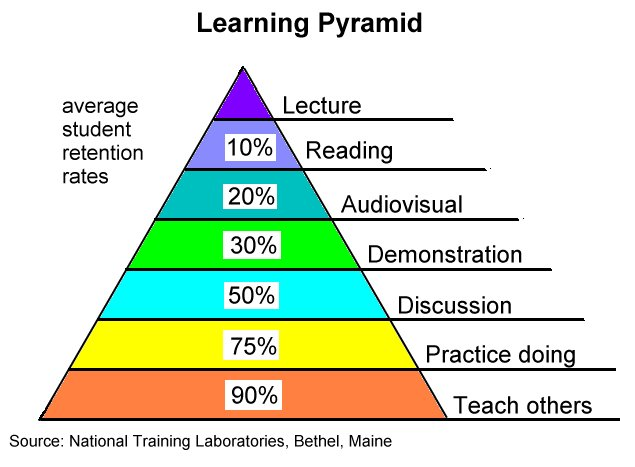
Professor Rogers then moved on to her own work, showing us a picture of the serried rank nightmare of a computer-based classroom: students in rows, isolated and focused on their screens. Instead of ‘designing for one’, why don’t we design to orchestrate shared activities, with devices that link to public displays and can actively foster collaboration. One of Professor Rogers’ students is looking at ways to share simulations across tablets and screens. This included “4Decades“, a a simulation of climate management, with groups representing the different stakeholders to loo at global climate economics. We then saw a video that I won’t transcribe. The idea is that group work encourages discussion, however we facilitate it, and this tends to leading to teaching others in the sharing of ideas. Another technology that Professor Rogers’ group have developed in this space is UniPad: orchestrating collaborate activities across multiple types of devices, with one device per 6-7 students, and used in classes without many researchers present. Applications of this technology include budgeting for students (MyBank), with groups interacting and seeing the results on a public display. Given how many students operate in share houses collaboratively, this is quite an interesting approach to the problem. From studies on this, all group members participated and used the tablet as a token for discussion, taking ownership of a part of the problem. This also extended to reflection on other’s activities, including identifying selfish behaviour on the part of other people. (Everyone who has had flatmates is probably groaning at the moment. Curse you, Love Tarot Pay-By-The-Minute Telephone Number, which cost me and my flatmates a lot of dollars after a flatmate skipped out on us.)
The next aspect Professor Rogers discussed was physical creation toolkits, such as MaKey MaKey, where you can build alternative input for a computer, based on a simple printed circuit board with alligator clips and USB cables. The idea is simple: you can turn anything you like into a keyboard key. Demonstrations included a banana space bar, a play dough MarioKart gamepad, and many other things (a water bowl in front of the machine became a cat-triggered photo booth). This highlights one of the most important aspects of thinking about learning: learning for life. How can we keep people interested in learning in the face of busy, often overfull, lives when many people still think about learning as something that had to be endured on their pathway into the workforce? (Paging my climbing friends with their own climbing wall: you could make the wall play music if you wanted to. Just saying.)
One of the computers stopped working during a trial of the MaKey MaKey system with adult learners and the collaboration that ensued changed the direction of the work and more people were assigned to a single kit. Professor Rogers showed a small video of a four-person fruit orchestra of older people playing Twinkle Twinkle Little Star. (MORE KIWI!) This elicited a lot of ideas, including for their grandchildren and own parent, transforming exercise to be more fun, to help people learn fundamental knowledge skills and give good feedback. We often heavily intervene in the learning experience and the reflection of the Fruit Orchestra was that intervening less in self-driven activities such as MaKey MaKey might be a better way to go, to increase autonomy and thus drive engagement.
Next was the important question: How can we gets to create and code, where coding is just part of the creating? Can we learn to code differently beyond just choosing a particular language? We have many fascinating technologies but what is the suite of tools over the top that will drive creativity and engagement in this area, to produce effective learning? The short video shown demonstrated a pop-out prefabricated system, where physical interfaces and gestures across those represented coding instructions: coding without any typing at all. (Previous readers will remember my fascination with pre-literate programming.) This early work, electronics on a sheet, is designed to be given away because the production cost is less than 3 Euros. The project is called “code me” from University College London and is designed to teach logic without people realising it: the fundamental building block of computational thinking. Future work includes larger blocks with Bluetooth input and sensors. (I can’t find a web page for this.)
What role should technology play in learning? Professor Rogers mentioned thinking about this in two ways. The inside learning using technology to think about the levels students to reach to foster attainment: personalise, monitor, motivate, flexible, adaptive. The outside learning approach is to work with other people away from the screen: collaborate, create, connect, reflect and play. Professor Rogers believes that the choice is ours but that technology should transform learning to make it active, creative, collaborative, exciting (some other things I didn’t catch) and to recognise the role of suspense in making people think.
An interesting and thought-provoking keynote.
The Antagonistic Classroom Is A Dinosaur
Posted: May 24, 2014 Filed under: Education, Opinion | Tags: advocacy, antagonism, collaboration, community, education, educational problem, educational research, higher education, reflection, students, thinking 2 CommentsIt’s been a while since I’ve posted but, in that time, I’ve been doing a lot of reading and a lot of thinking. I’m aware that as a CS Ed person whose background is in CS rather than Ed is that I have a lot of catching up to do in terms of underlying theory and philosophy. I’ve been going further back to look at the changes in education, from the assumption that a student is a blank slate (tabula rasa) to be written on (or an empty bank account to be filled) rather than as a person to be worked with. As part of my search I’ve been reading a lot and what has become apparent is how long people have been trying to change education in order to improve the degree and depth of learning and student engagement. It’s actually mildly depressing to track the last 250 years of people trying to do anything other than rote learning, serried ranks of silent students and cultural crystallisation. As part of this reading, and via Rousseau and Hegel, I’ve wandered across the early works of Karl Marx who, before the proletariat began its ongoing efforts to not act as he had modelled them, was thinking about the role of work and life. In essence, if what you are doing is not really a part of your life then you are working at something alien in order to earn enough to live – in order to work again another day. I’m not a Marxist, by any stretch of the imagination and for a variety of reasons, but this applies well for the way that many people see study as well. For many people, education is an end in itself, something to be endured in order to move on to the next stage, which is working in order to live until you stop working and then you die.
When you look at the methods that, from evidence and extensive research, now appear to be successful in developing student learning, we see something very different from what we have done before: we see cooperation, mutual respect, self-determination and a desire to learn that is facilitated by being part of the educational system. In this system, the school is not a cage for students and a trap for the spirit of education. However, this requires a distinct change in the traditional roles between student and teacher, and it’s one that some teachers still aren’t ready for and many students haven’t been prepared for. The future is creative and it’s now time to change our educational system to fully support that.
Ultimately, many of the ways that we educate place the teacher in a role of judgement and opposition to the student: students compete in order to secure the best marks, which may require them to withhold information from each other, and they must convince the teacher of their worth in order to achieve the best results. In order to maintain the mark separation, we have to provide artificial mechanisms to ensure that we can create an arbitrary separation, above the concept of competency, by having limited attempts on assignments and late penalties. This places the teacher in opposition to the student, an adversary who must be bested. Is this really what we want in what should be a mutually enriching relationship? When we get it right, the more we learn, the more we can teach and hence the more everyone learns.
If we search for the opposite of an antagonist, we find the following words: ally, helper, supporter and friend. These are great words but they evoke roles that we can’t actually fill unless we step out from behind the lectern and the desk and work with our students. An ally doesn’t force students to compete against each other for empty honours that only a few can achieve. A helper doesn’t tell students that the world works as if every single piece of assignment work is the most important thing ever assigned. A supporter develops deep structures that will hold up the person and their world for their whole life. A friend has compassion for the frailties of the humans around them – although they still have to be honest as part of that friendship.
My students and I win together when they achieve things. I don’t need to be smarter than them in order to prove anything and I don’t need them to beat me before they can demonstrate that they’re ready to go out into the world. If I held a pebble out in my hand and asked the student how they could get it, I would hope that they would first ask me if they could have it, rather than attempting some bizarre demonstration of hand-eye coordination. Why compete when we could all excel together?
We stand in exciting times, where knowledge can be shared widely and semi-instantly, but we won’t see the best of what we can do with this until we see an antagonistic classroom for the dinosaur that it is and move on.
Education and Paying Back (#AdelEd #CSER #DigitalTechnologies #acara #SAEdu)
Posted: March 22, 2014 Filed under: Education, Opinion | Tags: ACARA, advocacy, collaboration, community, cser, cser digital technologies, curriculum, design, digital education, digital technologies, education, educational problem, educational research, Generation Why, Google, higher education, learning, MOOC, Primary school, primary school teacher, principles of design, reflection, resources, school teachers, secondary school, sharing, teaching approaches, thinking, tools 2 CommentsOn Monday, the Computer Science Education Research Group and Google (oh, like you need a link) will release their open on-line course to support F-6 Primary school teachers in teaching the new Digital Technologies curriculum. We are still taking registrations so please go the course website if you want to sign up – or just have a look! (I’ve blogged about this recently as part of Science meets Parliament but you can catch it again here.) The course is open, on-line and free, released under Creative Commons so that the only thing people can’t do is to try and charge for it. We’re very excited and it’s so close to happening, I can taste it!
Here’s that link again – please, sign up!
I’m posting today for a few reasons. If you are a primary school teacher who wants help teaching digital technologies, we’d love to see you sign up and join our community of hundreds of other people who are thinking the same thing. If you know a primary school teacher, or are a principal for a primary school, and think that this would interest people – please pass it on! We are most definitely not trying to teach teachers how to teach (apart from anything else, what presumption!) but we’re hoping that what we provide will make it easier for teachers to feel comfortable, confident and happy with the new DT curriculum requirements which will lead to better experiences all ’round.
My other reason is one that came to me as I was recording my introduction section for the on-line course. In that brief “Oh, what a surprise there’s a camera” segment, I note that I consider the role of my teachers to have been essential in getting me to where I am today. This is what I’d like to do today: explicitly name and thank a few of my teachers and hope that some of what we release on Monday goes towards paying back into the general educational community.

You know who this is for.
My first thanks go to Mrs Shand from my Infant School in England. I was an early reader and, in an open plan classroom, she managed to keep me up with the other material while dealing with the fact that I was a voracious reader who would disappear to read at the drop of a hat. She helped to amplify my passion for reading, instead of trying to control it. Thank you!
In Australia, I ran into three people who were crucial to my development. Adam West was interested in everything so Grade 5 was full of computers (my first computing experience) because he arranged to borrow one and put it into the classroom in 1978, German (I can still speak the German I learnt in that class) and he also allowed us to write with nib and ink pens if we wanted – which was the sneakiest way to get someone’s handwriting and tidiness to improve that I have ever seen. Thank you, Adam! Mrs Lothian, the school librarian, also supported my reading habit and, after a while, all of the interesting books in the library often came through me very early on because I always returned them quickly and in good condition but this is where I was exposed to a whole world of interesting works: Nicholas Fisk, Ursula Le Guin and Susan Cooper not being the least of these. Thank you! Gloria Patullo (I hope I’ve spelt that correctly) was my Grade 7 teacher and she quickly worked out that I was a sneaky bugger on occasion and, without ever getting angry or raising a hand, managed to get me to realise that being clever didn’t mean that you could get away with everything and that being considerate and honest were the most important elements to alloy with smart. Thank you! (I was a pain for many years, dear reader, so this was a long process with much intervention.)
Moving to secondary school, I had a series of good teachers, all of whom tried to take the raw stuff of me and turn it into something that was happier, more useful and able to take that undirected energy in a more positive direction. I have to mention Ken Watson, Glenn Mulvihill, Mrs Batten, Dr Murray Thompson, Peter Thomas, Dr Riceman, Dr Bob Holloway, Milton Haseloff (I still have fossa, -ae, [f], ditch, burned into my brain) and, of course, Geoffrey Bean, headmaster, strong advocate of the thinking approaches of Edward de Bono and firm believer in the importance of the strength one needs to defend those who are less strong. Thank you all for what you have done, because it’s far too much to list here without killing the reader: the support, the encouragement, the guidance, the freedom to try things while still keeping a close eye, the exposure to thinking and, on occasion, the simple act of sitting me down to get me to think about what the heck I was doing and where I was going. The fact that I now work with some of them, in their continuing work in secondary education, is a wonderful thing and a reminder that I cannot have been that terrible. (Let’s just assume that, shall we? Moving on – rapidly…)
Of course, it’s not just the primary and secondary school teachers who helped me but they are the ones I want to concentrate on today, because I believe that the freedom and opportunities we offer at University are wonderful but I realise that they are not yet available to everyone and it is only by valuing, supporting and developing primary and secondary school education and the teachers who work so hard to provide it that we can go further in the University sector. We are lucky enough to be a juncture where dedicated work towards the national curriculum (and ACARA must be mentioned for all the hard work that they have done) has married up with an Industry partner who wants us all to “get” computing (Thank you, Google, and thank you so much, Sally and Alan) at a time when our research group was able to be involved. I’m a small part of a very big group of people who care about what happens in our schools and, if you have children of that age, you’ve picked a great time to send them to school. 🙂
I am delighted to have even a small opportunity to offer something back into a community which has given me so much. I hope that what we have done is useful and I can’t wait for it to start.

 Nick Falkner