
Let’s Get Intense! (On the road again for intensive teaching)
Posted: March 16, 2012 Filed under: Education | Tags: design, education, higher education, resources, teaching, teaching approaches, tools Leave a commentI’m sitting in Singapore as I write this, preparing for a weekend of intensive teaching. Our intensively delivered courses span months, as does a normal course, but features a combination of in-person and on-line instruction. The in-person segment is two weekends, over a month apart, where I go through half of the course with the students. We work 3 hours on Friday night, 6 hours on Saturday and 7 on Sunday. In between that time, we use electronic fora, assignments and, recently, tools like Piazza to keep the community together.
Intensive mode teaching presents some challenges, of course, but it does have its benefits. Yes, having students together for such an intense session does require you to structure your material well, but you can rely upon entire concepts being framed (primed) for students without the intervening week of ‘the rest of their lives’ abrading the principles. Then again, cognitive elastic being what it is, sometimes it needs to get stretched and relaxed in order to allow people to pick up a principle.
My guidelines for intensives are pretty straightforward and, as I prepare myself for teaching, I like to review them so I’ll share them with you here. The last time I was in Singapore, I talked about some specific teaching practices, these are more pleasantly wooly.
- Concepts shouldn’t span intensive weekend sessions. Pretty sensible here, try and keep the concepts in one day if possible. Yes, development over time is good, but we’re going to try and develop with minimal revision and then use priming and follow-up to address the other issues.
- Prime students for later work through questions, activities and assignments. Thinking time is not at a premium here, neither is digesting time, which brings us to…
- Follow-up on knowledge development with questions, activities and assignments. Teach it, ask for it, evaluate it, refine it, encourage knowledge.
- Break up your activities. Whatever the activity, don’t do it for more than a few sessions in a row. People get fatigued, then disengage, then get bored.
- Avoid passive lecturing. Wherever possible, involve the student. Get them to sketch their own answer, talk about them and tie it back to the core material. In the intensive I have already handed out all of the lecture notes – I have a record to refer to.
- Build on interesting questions to drive learning. Posit examples, get the class discussing (even gentle arguing) about the examples and force a need for them to get more knowledge.
- Shape their mental models through constant review of their in-class and on-line content. Correct, suggest, reinforce, reward. Operant conditioning is a powerful tool and it can be just as effective in an on-line setting.
- Follow-up in person if possible. Electronic communication can be cold and easy to misinterpret. If you can, set aside time to sit down to discuss problems that were raised between intensives to solve these ‘backwards and forwards’ e-mail or forum loops.
- Be active in whatever on-line spaces you provide. When you answer, people will ask more. The students should feel confident that you will answer and respond.
- Set aside some time each day to handle this class as if you had a physical lecture or consulting time with them every week. By making time to think about their work, their progression and their participation, you’ll make it easier to do all of the above.
I try to do all of this and I can be more or less successful but I know that the more of these I tick off, the better the experience for my students, so these as a set are always my goal.
From Zero To Legend (of Zelda): Rapid Achievements in Programming
Posted: March 13, 2012 Filed under: Education | Tags: Bret Victor, codea, education, higher education, resources, teaching, teaching approaches, tools Leave a commentWhen I first went to college, I had some programming experience because I’d been a keen Apple II programmer. This meant that I did have some idea of how much work was involved in making cool things happen on the computer. When you only had 7 colours in high res mode and you had to super pixel to make orange – you quickly realised that cool games took time. The people I started college with came in three varieties: people who could program in some sort of computer language (to varying degrees), people who knew what computers were but only as users, and people who had never touched one before. The people who had used them before, but had never programmed, used to gripe that we were doing all sorts of boring stuff and why couldn’t they just write a game? In fact, where were the graphics? (We were using a mainframe with dumb (text) terminals attached to it. GTC Infoton, VT102 emulation, 80×24, 2400 baud, all hooked up to an VAX 11/780. Yow.)

FEAR MY SERIAL NATURE!
These days, everyone has at least seen a computer and, as we all know, the things you can see on a computer today are mind-blowing. The graphics in just about any game can make you believe you’re in another world.
That, of course, is why a lot of people come to Computer Science and that, sadly, is also the reason that a lot of people are unhappy in first year. We teach them a lot of programming but, until recently, we didn’t use a language or environment that would allow them to do two important things:
- Do cool things.
- Show them off.
That’s where some of the great new(ish) languages are making their mark in early programming. Scratch and Alice, which I’ve referred to before, allow school students to make things happen. This allows them to do cool things and they can show it off to their friends – this makes what we do interesting, engaging, exciting and something that they may wish to pursue. At the other end of the spectrum, iOS and Android offer another pathway but they’re pretty high level in many ways – especially if you’re having to manually manage memory and write quite intricate code to handle Controllers or tie Views together. There’s no doubt that mobile platform computing is a short path to awesome but intro students may not be ready for the many complexities and pitfalls of starting in such a hostile world.
Students want to do amazing things as soon as they can because, for most of them, that’s why they came to us. Nobody came to listen to 7 lectures on the FOR loop. (At least, I really hope not!) We want to make amazing things happen.
So let me show you two other environments that may help students get there faster. One is an entire programming system based on the iPad, called Codea – your entire development environment sits on the iPad and you make programs, run programs and enjoy. Lots of good game widgets, premade content and you’re programming in Lua which is a pretty interesting language. (Full confession, Codea has been developed by some people I’ve known for a while but it’s interesting enough just to look at and, no, they don’t pay me. 🙂 ) It used to be called Codify (which explains the name in the video) but it’s now called Codea.
The other is from a link that a student sent me – he thought I’d find it interesting. (The full video is here.) It shows a development environment that allows you to modify variables in running code to fine-tune your game, allows you to freeze, roll forward and back and basically have fun while you program. There are also a lot of great concepts in what he discusses. The author and presenter is Bret Victor and he’s displaying his amazing interactive editor. (Seriously, go to Bret’s site. It will be one of the most interesting things you do all day.) I’ve put the intro video below. In the video, Bret’s editor is using JavaScript (another good “zero to legend” programming language) but with a lot of useful support that makes debugging and fine-tuning a lot more fun.
There are so many ways of approaching this problem – what’s great is that so many people are approaching it! They understand that everyone wants to be able to turn their dreams into reality and good support and development environments can help this.
[Edit: I’ve just realised that one of Mark’s posts that I had on my screen to read when I got back from SIGCSE provided another , and more detailed, look at Bret Victor. Seriously, if you’re not reading Mark’s Computer Science Education blog yet, you should. Save me the embarrassment of accidentally double posting. 🙂 ]
I Am Thinking, HE/SHE Is Procrastinating, THEY Are Daydreaming
Posted: March 10, 2012 Filed under: Education, Opinion | Tags: design, education, higher education, MIKE, reflection, resources, teaching, teaching approaches, work/life balance, workload 5 CommentsThis is a follow-up thought to my recent post on laziness. I spend a lot of time thinking and, sometimes, it would be easy to look at me and think “Wow, he’s not doing anything.” Sometimes, in my office, I stare at a wall, doodle, pace the corridor, sketch on the whiteboard or, if I’m really stuck, go for a walk down by the river. All of this helps me to clear and organise my thoughts. I use tools to manage what I have to do and to get it done in time but the cognitive work of thinking things through sometimes takes time. The less I sleep, the longer it takes. That’s why, while I’m jet lagged, I will do mostly catch-up and organisational work rather than thinking. Right now I can barely do a crossword, which is an excellent indicator that my brain is fried for anything much more complex than blogging. Given that I last slept in a bed over 30 hours ago, this isn’t surprising.
Now it’s easy to accept that I stumble around, somewhat absent-mindedly, because I’m an academic and you can all understand that my job requires me to do a lot of thinking…
But so many jobs require a lot of thinking to be done well – or , at least, the component tasks that go to make up modern jobs.
It’s a shame then that it’s activity that most people focus on rather than quality. If I were to sit in my office and type furiously but randomly, answer mails curtly, and never leave for coffee or cake, have to schedule meetings three weeks in advance – what a powerhouse I would appear! Except, of course, that I wouldn’t really appear to be that to people who knew what I was supposed to do. I don’t do the kind of job where I can move from task to task without, in most cases, detailed research including a search for new material, construction, creation, design, analysis, building, testing and executing. As always, this doesn’t make my job better or worse than anyone else’s, but I don’t carry out the same action repeatedly, an action that can be reduced in cognitive load with familiarity, I tend to do something at least slightly different each time. Boiler plate repetition is more likely to indicate that I am not doing my job correctly, given the roles that I hold.
So, if there are no points in a week where I sit there with books or papers or doodles or sketches of ideas and I think about them – then I’m really running the risk of not doing my job. I need to produce work of high quality and, because there’s a lot of new content creation, there’s creation/editing/testing… load throughout. Some of which, to an external viewer, looks like sitting around throwing paper into the bin while I hunt for solutions.
I think about this a lot for my students. I expect them, in a lecture, to not sit and think so much that they don’t communicate. I will try and bring them back from mental flights of fancy rather than let them fly off because I’ve only got an hour or two with them and need to try to get certain concepts across. And then what? Sometime in 4th year, or PhD, I expect them to flip a switch and realise that the apparent inactivity of quiet, contemplative thought is one of the most productive activities? That a day where you write eight pages, and on review only salvage half of one page, could be the most important and useful day in your PhD?
This is why I tend not to give out marks for ‘just anything’ – two pages of nonsense gets zero, there are no marks for effort because I am rewarding the wrong activity, especially where we haven’t achieved quality. Similarly, I don’t give out marks for attendance but for the collaboration – if you are after an activity, getting the students to do something, I think it’s always best to reward them for doing the activity, not just attending the framing session! But this, of course, comes hand-in hand with the requirement to give them enough timely feedback that they can improve their mark – by improving the quality of what they produce.
Electronic learning systems could be really handy here. Self-paced learning, with controlled remote assessment mechanisms, allows this thinking time and the ability to sit, privately, and mull over the problems. Without anyone harassing them.
Years ago, when I was still in the Army Reserve, we were on exercise for a couple of weeks and my soldiers were getting pretty tired because we’d been running 4 hour shifts to staff the radios. You sat on the radios for 4 hours, you were off for 4. Every so often you might get 6 hours off but it was unlikely. This meant that my soldiers were often sleeping in the middle of the day, desperately trying to make up lost sleep as well as periodically showering, shaving and eating. 4 hours goes really quickly when you’re not on duty. People in our base area who WEREN’T doing these shifts thought that my soldiers were lazy and, on at least two occasions, tried to wake them up to use them on work parties – digging holes, carrying things, doing soldier stuff. My soldiers needed their sleep and I was their commander so I told the other people, politely, to leave them alone. My operators had a job to do and maintained the quality of their work by following a very prescribed activity pattern – but the people around them could only see inactivity because of their perspective.
Maybe it’s time to look at my students again, look at what I’m asking them to do and make sure that what I’m asking and that the environment I’m giving them is the right one. I don’t think we’re doing too badly, because of previous reviews, but it’s probably never too soon to check things out again.
Staring In The SIGCSE Mirror
Posted: March 9, 2012 Filed under: Education | Tags: education, higher education, reflection, resources, sigcse, teaching, teaching approaches, work/life balance Leave a commentOne of the great things about going to a top notch conference like SIGCSE is that you get a lot of exposure to great educators bringing their A game for their presentations and workshops. It’s a great event in many ways but it’s also highly educational. I wrote furiously during the time that I was there (and there are still some blog posts to come) because there was so much knowledge flowing, I felt that I had to get it all down.
It is also valuable because it is humbling. There are educators who are scraping together feather, burnt cork and a few pebbles and producing educational materials and content that would knock your socks off. Given that attending SIGCSE is a significant financial expenditure for an Australian, it’s a quiet reminder that my journey to SIGCSE had better have a valuable outcome now that I’m back. A lot of my colleagues are doing amazing things with far less – I have no excuse to not do at least as well. (And I’ve certainly been trying.)
It’s inspirational. Sometimes it feels like we’re all adrift in a giant cold sea, in little boats, in the dark. We do what we can in our own space but have no idea how many people are out there. Yet there are so many other people out there. Holding up our lights allows us to see all of the other boats around us – not a small fishing fleet but a vast, floating city of light. Better still, you’ll see how many are close enough to you that you can ask them for help – or offer them assistance. Sound, ethical education is one of the great activities of our species, but it’s not always as valued as it could be – it’s easier when you have some inspiration and a sea full of stars.
It’s levelling. It doesn’t matter whether you’re from the greatest or the smallest college – if your work was accepted to SIGCSE then other people will hear about it. Your talk will be full of people from all over the sphere who want to hear about your work.
It encourages people to try techniques so that they, in turn, may come back and present one day. It also reminds us that there is a place where CS Education is the primary, valued, topic of conversation and, in these days of the primacy of research value, that’s an important level of encouragement.
There are so many more things that I could say about the experience but I think that my volume of blogging speaks pretty much for itself on this event. How did it make me feel? It made me want to be better at what I did, a lot better, and it gave me ways to do that. It made me hungry for new challenges at the same time it gave me the materials and tools to bring a ladder to scale those challenges.
I’ve always said that I don’t pretend to be an expert – that this blog is reflective, not instructive or dogmatic – but that doesn’t mean that I don’t strive to master this area. Attending events like SIGCSE helps me to realise that, with work and application, one day I may even manage it.
SIGCSE, Keynote #2, Hal Abelson, “The midwife doesn’t get to keep the baby.”
Posted: March 3, 2012 Filed under: Education, Opinion | Tags: abelson, authenticity, DSpace, education, higher education, mit, MITx, OCW, reflection, resources, sigcse, teaching, teaching approaches 6 CommentsWell, another fantastic keynote and, for the record, that’s not the real title. The title of the talk was From Computational Thinking to Computational Values. For those who don’t know who Hal Abelson is, he’s a Professor of EE/CS at MIT who has made staggering contributions to pedagogy and the teaching of Computer Science over the years. He’s been involved with the first implementations of Logo, changed the way we think about using computer languages, has been a cornerstone of the Free Software Movement (including the Foundation), led the charge of the OpenCourseWare (OCW) at MIT, published many things that other people would have been scared to publish and, basically, has spent a long time trying to make the world a better place.
It went without saying that, today, we were in for some inspiration and, no doubt, some sort of call to arms. We weren’t disappointed. What follows is as accurate a record as I could make, typing furiously. I took a vast quantity of notes over what was a really interesting talk and I’ll try to get the main points down here. Any mistakes are mine and I have tried to represent the talk without editorialising, although I have adjusted some of the phrasing slightly in places, so the words are, pretty much, Professor Abelsons’s.
Professor Abelson started from a basic introduction of Computational Thinking (CT) but quickly moved on to how he thought that we’d not quite captured it properly in modern practice: it’s how we look in this digital world and see it as a source of empowerment for everybody, as a life changing view. Not just CT, but computational values.
What do we mean? We’re not only talking about cool ideas but that these ideas should be empowering and people should be able to exercise great things and have an impact on the world.
He then went on to talk about Google’s Ngram viewer, which allows you to search all of the books that Google has scanned in and find patterns. You can use this to see how certain terms, ideas and names come and go over time. What’s interesting here is that (1) ascent to and descent from fame appears to be getting faster and (2) you can visualise all of this and get an idea of the half-life of fame (which was nearly the title of this post).
Abelson describes this as a generative platform, one which can be used for things that were not thought of it when it was built, one we can build upon ourselves and change over time. Generating new things for an unseen future. (Paper reference here was Nature, with a covering article from another magazine entitled “Researchers Aim to chart intellectual trends in Arxiv”)
Then the talk took a turn. Professor Abelson took us back, 8 years ago, when Duke’s “Give everyone an iPod” project had every student (eventually) with a free iPod and encouraged them to record, share and mix-up what they were working with.
Enter the Intellectual Property Lawyer. Do the students have permission to share the lecturer-created creative elements of the lectures?
Professor Abelson’s point is that we are booming more concerned with locking up our content into proprietary Content Management Systems (CMS) and this risks turning the academy into a marketplace for packaged ideas and content, rather than a place of open enquiry and academic freedom. This was the main theme of the talk and we’ve got a lot of ground left to cover here! This talk was for those who loved computational values, rather than property creation.
We visited the early, ham-fisted attempts to grant limited licences for simple activities like recording lectures and the immediately farcical notion that I could take notes of a lecture and be in breach of copyright if I then discussed it with a classmate who didn’t attend. Ngrams shows what happens when you have a system where you can do what you like with the data – what if the person holding that data for you, which you created, starts telling you what to do? Where does this leave our Universities?
Are we producing education or property? Professor Abelson sees this as a battle for the soul of the Universities. We should be generative.
We can take computational actions, actions that we will take to reinforce the sense that we have that people ought to be able to relish the power that they get from our computational thinking and computational ideas. This includes providing open courseware (like MIT’s OCW and Stanford’s AI) and open access to research, especially (but not only) when funded by the public purse.
As a teaser, at this point, Abelson introduced MITx, an online intensive learning system that opens up on MONDAY. No other real details – put it in your calendar to check out on Monday! MIT want their material and their content engines to be open source and generative – that word again! Put it into your own context or framework and do great things!
The companion visions to all of this are this:
- Great learning institutions provide universal access to course content. (OpenCourseWare)
- Great research institutions provide universal access to their collective intellectual resources.(DSpace)
What are the two reasons that we should all support these open initiatives? Why should we fill in the moat and open the drawbridge?
- Without initiatives to maintain them, we risk marginalising our academic values and stressing our university communities.
- To keep a seat at the table in decisions about the disposition of knowledge in the information age.
Abelson introduced an interesting report, “Who Owns Academic Work? Battling for Control of Intellectual Property”, which discusses the conflation of property and academic rights.
Basically, scientific literature has become property. We, academia, produce it and then give away our rights to journal publishers, who give us limited rights in exchange on a personal level and then hold onto it forever. Neither our institution nor the public has any right to this material anymore. We looked at some examples of rights. Sign up to certain publishers and, from that point on, you can use only up to 250 words of any of the transferred publications in a new work. The number of publishers is shrinking and the cost of subscription is rising.
Professor Abelson asked how it is that, in this sphere alone, the midwife gets to keep the baby? We all have to publish if we act individually, as promotions and tenure depend upon publication in prominent journals – but that there was hope (and here he referred to the Mathematical boycott of the Elsevier publishing group). HR 3699 (the Research Works Act) could have challenged any federal law that mandated open access on federally funded research. Lobbied for by the journal publishing group, it lost support, firstly from Elsevier, and then from the two members of Congress who proposed it
Even those institutions that have instituted an open access policy are finding it hard – some publishers have made specific amendments to the clause that allows pre-print drafts to be display locally to say “except where someone has an institutionally mandated open access policy”.
BUT. HR3699 has gone away for now. Abelson’s message is that there is hope!
We have allowed a lot of walled gardens to spring up. Places where data is curated and applications made available, but only under the permission of the gardener. Despite our libraries paying up to hundreds of thousands of dollars for access to the on-line journal stores, we are severely limited in what we can do with them. Your library cannot search it, index it, scrape it, or many other things. You can, of course, buy a service that provides some of these possibilities from the publisher. A walled garden is not a generative environment.
Jonathan Zittrain, 2008, listed two important generative technologies: the internet and the PC, because you didn’t need anyone’s permission to link or to run software. In Technology Review, now, Zittrain thinks that the PC is dead because of the number of walled gardens that have sprung up.
In Professor Abelson’s words:
“Network Effectslead toMonopoly Positionslead toConcentration of Channelslead toDecline of Generativity.“
“We have the spark of inspiration about how one should relate to their information environment and the belief that that kind of inspiration, power and generativity should be available to everybody.These beliefs are powerful and have powerful enemies. Draw on your own inspiration and power to make sure that what inspired us is going to be available to our students.“
Fred Brooks: Building Student Projects That Work For Us, For Them and For Their Clients
Posted: March 3, 2012 Filed under: Education | Tags: authenticity, curriculum, design, education, fred brooks, higher education, mythical man month, principles of design, project, reflection, resources, software engineering, teaching, teaching approaches, universal principles of design 3 CommentsIn the Thursday keynote, Professor Brooks discussed a couple of project approaches that he thought were useful, based on his extensive experience. Once again, if you’re not in ICT, don’t switch off – I’m sure that there’s something that you can use if you want to put projects into your courses. Long-term group projects are very challenging and, while you find them everywhere, that’s no guarantee that they’re being managed properly. I’ll introduce Professor Brooks points and then finish with a brief discussion on the use of projects in the curriculum.
Firstly, Brooks described a course that you might find in a computer architecture course. The key aspect of this project is that modern computer architecture is very complex and, in many ways, fully realistic general purpose machines are well beyond the scope of time and ability that we have until very late undergraduate study. Brooks works with a special-purpose unit but this drives other requirements, as we’ll see. Fred’s guidelines for this kind of project are:
- Have milestones with early delivery.
Application Description
Students must provide a detailed application description which is the most precise statement that the students can manage. A precise guess is considered better here than a vague fact, because the explicit assumption can be questioned and corrected, where handwaving may leave holes in the specification that will need to be fixed later. Students should be aware of how sensitive the application is to each assumption – this allows people to invest effort accordingly. The special-purpose nature of the architecture that they’re constructing means that the application description has to be very, very accurate or you risk building the wrong machine.Programming Manual (End of the first month as a draft)
Another early deliverable is a programming manual – for a piece of software that hasn’t been written yet. Students are encouraged to put something specific down because, even if it’s wrong, it encourages thought and an early precision of thought. - Then the manual is intensely critiqued – students get the chance to re-do it.
- The actual project is then handed in well before the final days of semester.
- Once again the complete project goes through a very intense critique.
- Students get the chance to incorporate the changes from the critique. Students will pay attention to the critique because it is criticism on a live document where they can act to improve their performance.
The next project described is a classic Software Engineering project – team-based software production using strong SE principles. This is a typical project found in CS at the University level but is time-intensive to manage and easy to get wrong. Fred shared his ideas on how it could be done well, based on running it over 22 years since 1966. Here are his thoughts:
- You should have real projects for real clients.
Advertise on the web for software that can be achieved by 3-5 people during a single semester, which would be useful BUT (and it’s an important BUT) you can live without. There must be the possibility that the students can fail, which means that clients have to be ready to get nothing, after having invested meeting time throughout the project.
- Teams should be 3-5, ideally 4.
With 3 people you tend to get two against one. With five, things can get too diffuse in terms of role allocation. Four is, according to Fred, just right.
- There should be lots of project choices, to allow teams choice and they can provide a selection of those that they want.
- Teams must be allowed to fail.
Not every team will fail, or needs to fail, but students need to know that it’s possible.
- Roles should be separated.
Get clear role separations and stick to them. One will look after the schedule, using the pitchfork of motivation, obtaining resources and handling management one level up. One will be chief designer of technical content. Other jobs will be split out but it should be considered a full-time job.
- Get the client requirements and get them right.
The client generally doesn’t really know what they want. You need to talk to them and refine their requirements over time. Build a prototype because it allows someone to say “That’s not what I want!” Invest time early to get these requirements right!
- Meet the teams weekly.
Weekly coaching is labour intensive and is mostly made up of listening, coaching and offering suggestions – but it takes time. Meeting each week makes something happen each week. When a student explains – they are going to have to think.
- Early deliverable to clients, with feedback.
Deadlines make things happen.
- Get something (anything) running early.
The joy of getting anything running is a spur to further success. It boosts morale and increases effort. Whatever you build can be simple but it should have built-in stubs or points where the extension to complexity can easily occur . You don’t want to have to completely reengineer at every iteration!
- Make the students present publicly.
Software Engineers have to be able to communicate what they are doing, what they have done and what they are planning to do – to their bosses, to their clients, to their staff. It’s a vital skill in the industry.
- Final grade is composed of a Team Grade (relatively easy to assess) AND an Individual Grade (harder)
Don’t multiple one by the other! If effort has been expended, some sort of mark should result. The Team Grade can come from the documentation, the presentation and an assessment of functionality – time consuming but relatively easy. The Individual Grade has to be fair to everyone and either you or the group may give a false indication of a person’s value. Have an idea of how you think everyone is going and then compare that to the group’s impression – they’ll often be the same. Fred suggested giving everyone 10 points that they allocated to everyone ELSE in the group. In his experience, these tallies usually agreed with his impression – except on the rare occasion when he had been fooled by a “mighty fast talker”
This is a pretty demanding list. How do you do tasks for people at the risk of wasting their time for six months? If failure is possible, then failure is inevitable at some stage and it’s always going to hurt to some extent. A project is going to be a deep drilling exercise and, by its nature, cannot be the only thing that students do because they’ll miss out on essential breadth. But the above suggestions will help to make sure that, when the students do go drilling, they have a reasonable chance of striking oil.
Leibhardt: The Game Sensation That’s… not sweeping anywhere (yet!)
Posted: February 27, 2012 Filed under: Education | Tags: design, education, games, higher education, leibhardt, reflection, resources, teaching, teaching approaches, universal principles of design Leave a commentToday’s post is going to tie together my posts on design and, to illustrate it, I’m going to show you one of the game screens that my Summer Research Scholarship student produced. The game is called Leibhardt and it’s a way of teaching students about adding and removing items to commonly used data structures in Computer Science and programming. Here’s the picture of the playing space, as seen by one of the opponents:
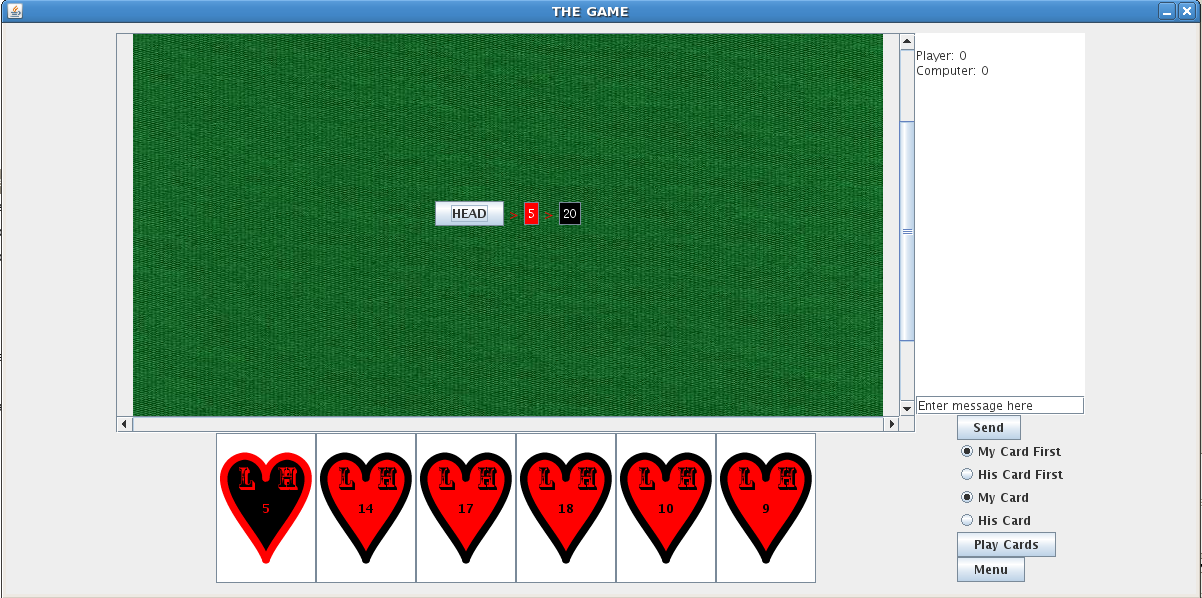
This is still a work in progress but let’s review the production and design process. I set the student a task: to find a way to teach a Computer Science concept using a game. I then gave him a stack of books, a central book as key text, and asked him to go away and come back with some ideas. He then presented a number of good ideas and I selected my prime candidate (which was also his). He then had to present a detailed plan with weekly goals. The project was only six weeks long so we had no time to waste. Over the next few weeks, we developed ideas, refined them and he turned it all into a game, with the assistance of another member of staff who I won’t uniquely identify but, thanks, Claudia!
Let’s look at this in terms of some of the principles I’ve been discussing. We decided to use a game because games are familiar to many people (functional consistency) and the appearance of card games is also something everyone understands (aesthetic consistency). Look at the image. Yes, the cards need some work but it’s got that green baize background we expect and, once the cards are finished, your fingers will naturally be drawn to the cards to select them for playing. I provided a set of nudges to keep the student on the right track, throughout the project, by providing appropriate and directed feedback, as well as controlling the books that he started with and keeping a fairly tight rein on the project until I was sure that he was on the right track. The game itself is full of nudge elements as well to keep the player going – this is a fairly addictive game. I’ve encouraged him to use GUI elements that can only be used in the right way (which is the affordance principle in action), as well as making sure that the system looks the same as every other Java-based game (external consistency). We’re still working on the look and feel of the structures themselves – they need to be consistent with what students have seen before, which is internal consistency in terms of the course context.
Finally, it’s possible for people to easily interrupt and resume games, for me to monitor activity so I can tell if people are undertaking assigned work on playing this game and there also degrees of difficulty involved. This gives us fairly fine-grained control over the performance load of the activity, and greatly reduces the kinematic and cognitive load of playing. Students who are new can choose to, or be expected to, expend less effort to achieve a good result. Expert students can crank up the difficulty and make the task harder. Any student can play it easily, stop playing and then pick it up again later.
I must point out that, while I’ve been heavily involved in the design and mentoring process, what I’ve mostly been doing is guiding a good student and helping him to make good decisions. I’m happy with my contribution but a lot of what I’ve been doing has been helping to organise information for decision making purposes – effectively providing guidance on using the five hat racks.
I hope that this helps you to understand that the design I’m talking about is not choosing Powerpoint templates, although that can be part of it, but is more of a deep-seated commitment to thinking about what we’re doing in order to produce the best work possible. We’re still working on the game and, with any luck we’ll have some versions available for teachers of Data Structures relatively soon.
Moving Down the Road Trying to Lighten My Load: Performance Load (and taking it easy)
Posted: February 26, 2012 Filed under: Education | Tags: design, education, higher education, resources, teaching, teaching approaches, universal principles of design, workload Leave a commentThis is one of the posts of design that, I hope, will help to establish that good design is not just about images, Photoshop and Illustrator! I’m really enjoying the book that all of this is coming from (for those of you who are new to this blog, that’s Universal Principles of Design, Lidwell et al, Revised, 2010). I’ve not had the vocabulary to express a lot of what I’ve learned and that, of course, makes it very hard to communicate. This blogging process has really helped me to tie everything together – but this one is particularly important because it explains why we have to make the effort to manage the load that our students encounter in our courses.
Whenever you’re trying to achieve a goal, you’re going to have to expend effort – in terms of mental and physical activity. When the load gets high, the time it takes to get the job done increases but, regrettably, it’s not just the time it takes that increases – the possibility of error increases and the chances of success starts to drop away. If the load is manageable, then the time reduces, the possibility of error drops and you increase the chance of success. This is the performance load of a task and I suspect that this is one of the key problems in the preparation of a lot of teaching materials and support. There has been an attitude that some of what we teach can’t just be offered – that effort has to expended for the students to value it, or to show that they’re ready for the material. Without going in to too much commentary on this, because I think it’s an attitude that is often used as an excuse rather than a real philosophy, if this is the attitude, that there is an effort barrier, then this has to very carefully managed or the performance load is going to cause an unnecessarily high level of failure.
How easy was it to read that last sentence? What if I’d said “I’m not sure I agree with this, but if there is an effort barrier, we must manage it carefully. Performance load can increase to the point where failure may be inevitable.” Is that easier?
What does load look like for tasks? If it’s moving things around then our muscles come into play, our ability to physically interact with our environment. If it’s thinking then we have to use our cognitive abilities to identify and complete the task. Fundamentally, there are two type of load:
- Kinematic load is a measure of the physical activity involved – strength, number of steps, repetition of action, amount of force involved – to accomplish something. Not many teaching activities will have a strength-related load component (which is good, as it means fewer accessibility concerns) but any time that we introduce an activity that requires physical steps, we’ll reduce the kinematic load if we cut that number of steps down as far as possible. Allowing students to submit their assignments electronically reduces the requirement to print the work, staple it, and physically attend a submission place to submit it. Think about how many things could go wrong in that chain – everything from paper out in the printer, to a water leak destroying all of the paperwork once it’s submitted.
- Cognitive load is how much thinking we’re going to have to do to achieve our goal. How much are you expecting someone to remember? Most people can only hold a few things in their heads at one point – fighting this is pushing water uphill. Keeping your concepts clear and your explanations simple can really help with this. Keeping your presentations simple stops people having to filter out things that aren’t relevant – use consistency in your materials and, if you’re trying to keep everything accessible, consider producing separate sets of material so that information that is useful to one group isn’t considered ‘clutter’ to another. (If you want a good example, look at subtitled movies. One subtitle is okay, but I’ve seen movies subtitled in Chinese characters, English and Tamil simultaneously. It leaves about half the screen for the content and makes the film hard to watch!)
However you reduce performance load, you have to remember that there will be a minimum load – assuming that you don’t change the requirements of the task. This can be easy to get wrong. Abuse of load reduction can be prevalent in students. If you consider plagiarism, this used to much harder than it is now that we have networked computers and the Internet. The cognitive load reduction of copying was still quite high, but it required an equivalent amount of kinematic load because of the requirement to rewrite the work (or type it in again from a print-out). So, just being aware of load reduction is only part of the battle – how we reduce performance load has to be considered while still understanding that we can’t reduce the requirements of the task itself.
I think this is what people are always suspicious of when we talk about design – that somehow considering design will demean, cheapen or over-simplify the task. I agree that this is something we should think about, but I certainly don’t think that it’s inevitable.
Consistency: Doing the Same Thing Can Be Useful!
Posted: February 25, 2012 Filed under: Education | Tags: education, higher education, principles of design, resources, teaching, teaching approaches, universal principles of design 9 CommentsAnother day, another design post, but this post is not going to be that huge because I’ve already shown you several examples of what I’m talking about today. Systems are more usable when similar parts are expressed in similar ways – that’s why OS X’s steady convergence with iOS is probably going to bring more people to both platforms than lose grumpy people who don’t like the ‘new’ interface. If one Apple platform allows you the familiarity to use any other, the consistency will make people happy.
And that’s today’s principle for discussion: consistency. Again, it’s from Universal Principles of Design, Lidwell et al, Revised, 2010. People will learn new things more quickly, focus on the right things and be able to transfer their knowledge more easily if the system is consistent. There are four basic considerations and I’m going to show them to you in exactly the same format that I’ve been using for all of these posts. Well, I’ve been trying to be consistent. It’s possibly been similar enough that when you see bold italic you think ‘design principle’ and when you see a bulleted list with leading bolds you think ‘aspect’ or ‘facet’. Sorry for the priming but I’m trying to make a point here 🙂 Anyway, here are the four kinds of consistency.
- Aesthetic consistency: Is everything similar or the same in terms of style and appearance? I adopted a standard template for my lectures in one course, with strong visual indicators of transitions to different modes. As a result, students always knew which lecture they were in and what was expected of them in terms of participation and activity.
- Functional consistency: This is consistency in what things mean and how they’re used. How do students hand-in their work – do they always do the same things to make a hand-in work? Does button X always produce result Y? We can also use pre-existing knowledge of function to our benefit and save ourselves the effort of having to teach someone how to approach our work, from scratch. Use existing knowledge of functional actions, and their associated symbols, to make your work easier. (Here’s a thinking point: the save Icon for many systems is an image of a 3.5″ floppy disk. I polled my students and over 70% of them had only seen the disk in this context. What does ‘save’ look like in a cloud-based context?)
- Internal consistency: The elements inside your system or set of materials should be consistent with each other. Once you’ve learned one part of the system, the others won’t surprise you by being completely different. This also makes people believe that you have actually bothered to design a system, rather than stitch it together out of other, inconsistent, parts.
- External consistency: How do your objects, materials or systems work inside the overall environment of your students? This is a tricky one because innovation sometimes means that you’re out of step (let’s say ahead of step) with other people. Just because nobody else uses lecture recordings and you do isn’t a violation of external consistency. However, there will be core design standards across most areas (to at least a degree) and adherence to these is important or it’s easy for students to get confused. If you are diverging from this standard, you must take the additional effort to address the inconsistency to reduce confusion.
As Lidwell notes, aesthetic and functional consistency should be considered in almost everything we do – aesthetic consistency allows us to produce a distinct idea, and functional consistency makes it easier for people to learn. The other requirements drive the need for internal and external specifications that work and are observed. All we’re really doing here is trying to make it easier for people to learn, and that should never really be that controversial.
(Wait, what was that about priming? And haven’t you mentioned that before? Yes, I have. Further discussion is coming soon.)

 Nick Falkner