
SIGCSE First night, Workshop: CS Unplugged!
Posted: March 2, 2012 Filed under: Education | Tags: design, education, games, higher education, sigcse, teaching, teaching approaches, tools 1 CommentGot back from the first workshop a couple of hours ago, Workshop 9: Computer Science Unplugged, Robotics and Research Activities, Tim Bell, Daniela Marghitu and Lynn Lambert. Daniela couldn’t make it this evening so her place was expertly filled by another pair from Auburn. I’ve talked about CS Unplugged before but it was fascinating to see the experts talking about their experiences and giving us all the experience of what it’s like to be in an Unplugged classroom. I took some photos which will probably capture the immersive and enjoyable sense of this hands-on experience.
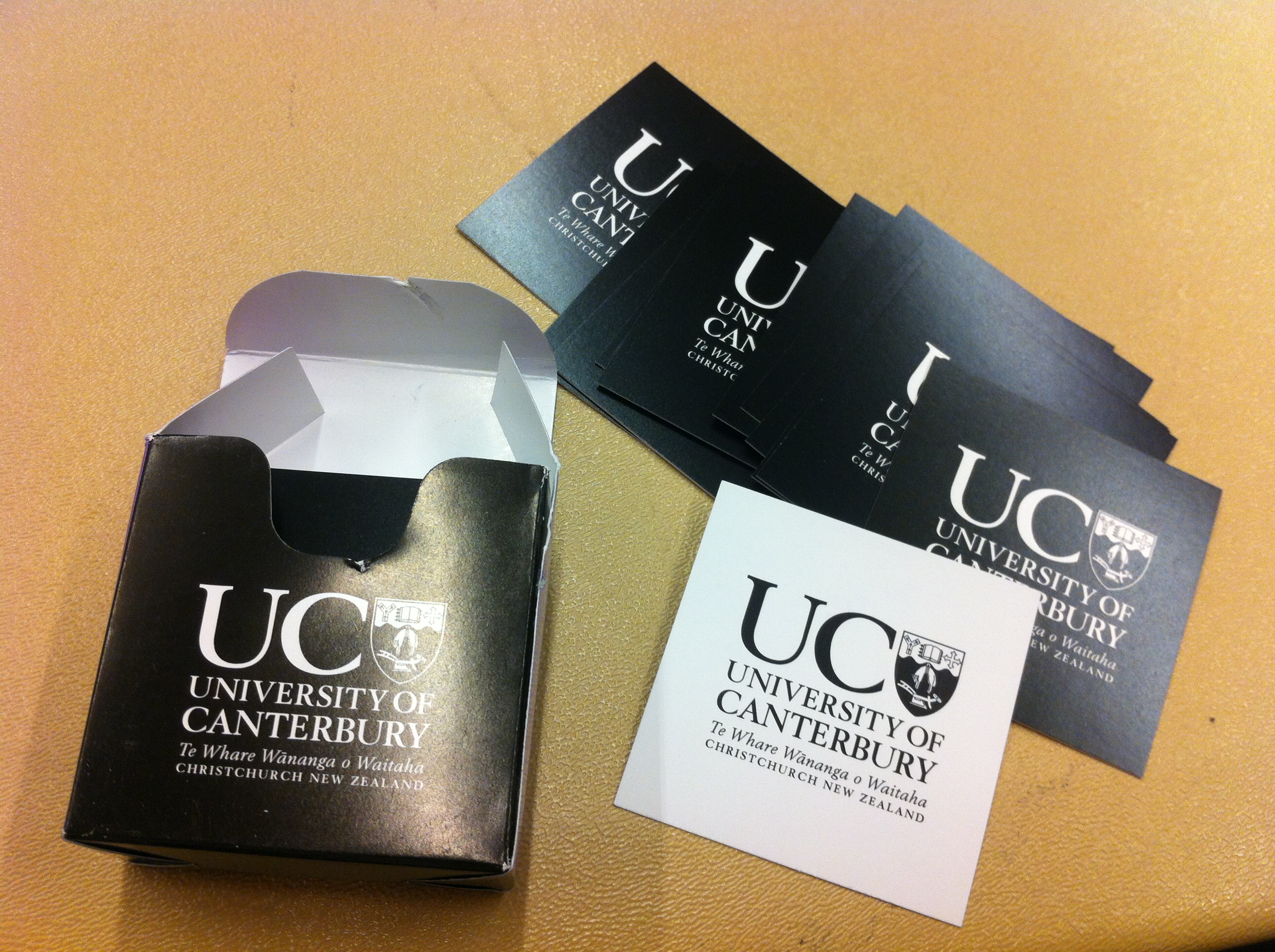
Here are some of the double-sided cards that can be used to show the 2D parity trick, where students are drawn into constructing the use and checking of parity with a simple 5×5 (or 9×9) grid of cards. Basically, once drawn up the student can flip any of the cards and the instructor can walk in from outside and legitimately pick the flipped card.
These are Tim’s, from the University of Canterbury, and they are both a handy tool for CS Unplugged and a cool way to give people a calling card of who gave you the talk.
Tim and Lynn were very honest about the degree of knowledge that could be conveyed to elementary school students – we’re not talking about getting all of the CS completely accurate but, in a setting where we can get lost in the cracks, the students would remember that CS people came to their school and it was interesting and engaging. (And, for me, the CS is pretty close. 🙂 )
The next picture is of a Pirate’s Treasure puzzle, where students have to pick A or B and, depending on what they choose, they hop to different islands. This introduces several key computing concepts: Finite State Automata,  Complexity but, for me, it also makes students think about exploring a space in order to be able to improve their decision and thinking processes.

The next picture is slightly curious and, rather than being an activity, it’s a diagram showing all the states that a VCR could end up in when you’re setting the clock – and the number of different pathways between them. Is it any wonder that these devices give us trouble? Building on what students had learned about the different islands (states) that you could catch a ship to (transition to) – it suddenly explains why human interface design is so incredibly important.
Overall, this was a great workshop. We had many participatory activities – I was the bit representing ‘4’ for a very happy 10 minutes – and an excellent display of robotics and how they could be used with students in camp activities. Also, somewhat counterintuitively, how robots could be used to teach CS Unplugged.
From a theoretical perspective, CS Unplugged is heavily constructivist. In informal terms, constructivists assert that the generation of knowledge and meaning in humans comes from an interaction between what they experience and the frameworks that they have in their head. In this case, CS Unplugged, the basic goal is to present something with which a student can interact, but in its affordance and its goals, it drives them towards forming the correct knowledge of an area of CS, even without us explaining anything. To give an example, the student in the picture had learned quick sort enough to demonstrate it, despite never being explicitly told what quick sort was. She’s 12. The numbers in the pictures show the number of steps for a student using a simple sorting technique, and the one that she used. Yes, she’s shaved over half the steps off.

We had many examples like this – students who learned to count in binary from observation and interaction, without anyone having to formally discuss powers of two or underlying mathematics.
To be honest, I can’t do a three-hour workshop justice in 700 words, and I’d like to get some sleep before tomorrow’s keynote. However, if you haven’t checked out the CS Unplugged website yet, then I strongly recommend it. If you get the chance to see these presenters at work, then I strongly suggest that, too.
Another month, another milestone!
Posted: March 1, 2012 Filed under: Education, Opinion | Tags: blogging, education, higher education, reflection Leave a commentThat’s another month of blogging down. At some stage, I plan to measure what my output has been and try to come up with some indication of how I can improve my content. I’ll probably try to make things tighter, add some picture, but have separate longer essays occasionally.
Only 10 more months of 1 post / day to keep to my original goal!
Thanks for reading – if you’re new, you can start at Jan 1 and work forward, if you’re a long-time reader, thanks for sticking around.
I wanted to put a picture of success or winning here but, frankly, there are only so many pictures of grumpy babies and Charlie Sheen that anybody needs. So enjoy the rapturous and simplistic text. I’ll see you tomorrow.
Familiarity: Breeding Contempt or Just Contextually Sensitive?
Posted: March 1, 2012 Filed under: Education, Opinion | Tags: authenticity, education, familiarity breeds contempt, higher education, reflection, teaching, teaching approaches 1 CommentOne of the strangest homilies I know is “Familiarity breeds contempt”. Supposedly, in one reading, the more we know someone, the easier it is to find fault. In another, very English, reading of it, allowing someone to be too familiar with you reduces the barriers between you and allows for contempt. (It’s worth noting that being over-familiar with someone and using their first name or a diminutive ahead of an often unstated social timeframe was a major gaffe in society. Please, call me Nick. 🙂 )
What a strange thought that is – that we must maintain an artificial distance lest we be found to be human. There’s a world of behaviour between maintaining professionalism and being stand-offish – one allows you to maintain integrity and do things like provide an objective mark, the other drives a wedge between you and your students. This is a very hard line to handle when you’re teaching K-12, because the winnowing hasn’t occurred yet. In the Higher Ed sector, as I’ve noted before, everyone who couldn’t concentrate or acted up is probably already gone. I have the polite ones, the ones who passed, the ones who didn’t sit there and cut pieces off people’s hair or be generally anti-social.
I have to walk a careful line on this one when I teach in Singapore, because it is a more formal society. Business cards are presented formally, business relationships have more structure and my students prefer to call me Sir or Dr Nick (Hi, everybody!). Now, I’m happy for them to call me Nick but, here’s the tricky thing, not if that means that they have moved me into the box of people that they don’t respect. That’s a cultural thing and, by being aware of it, I manage the relationship better. Down in Australia, I expect my students to call me Nick, because we don’t have as heavily formalised a society and I feel that I can manage my objectivity and relationships without the strictures of being Dr Falkner. But I have a lot of international students and sometimes it just makes them happier to call me Dr Falkner or Sir.
Ultimately, as part of this juggling act, it’s not my view of what is and what is not formal that matters – it’s how the student wants to address me that they feel that I am their teacher, and that they are getting the right kind of education. This then allows us both to work together, happily. If someone calling me Nick is going to put fingernails down the blackboard of their soul, then me insisting upon informality is inappropriate.
When I’m in the US, I take the trouble to explain that I have a PhD and am a tenured Assistant Professor in US parlance, a Lecturer Level B in Australian jargon, because it helps people to put me into the right mental box. This is the other trick of familiarity – you have to make sure that your level of being familiar is contextually correct. It bugs me slightly that I have given talks where people’s attitudes towards me and my material change when they find out I’m tenured and a Doctor, but it’s always my job to work out how to communicate with my audience. If I presume that every audience is the same then I risk being over and under-familiar – and, because I haven’t done my research as to how to deliver my message to that audience , that’s when I risk breeding contempt.
Another Airport Land Speed Record: Can My Students Make Their Connections?
Posted: February 29, 2012 Filed under: Education, Opinion | Tags: curriculum, design, education, higher education, principles of design, reflection, universal principles of design, workload 2 CommentsAs I was running through San Francisco Airport last week, I was thinking many things. Among them were:
- Why am I running through yet another airport?
- How long will it be before my bad knee gives out? (Surgery last November)
- Is my wife still behind me?
- Do I ever do this to my students?

The reason that I was, once again, running through an airport was that delightfully evil concept – the legal connection. This is the minimum connection time estimated for your incoming and outgoing flights, through a given airport. When your travel organiser goes to make flights, they plug all of your destinations and restrictions into their computer, add some seriously manual machinations, and then receive a set of results that all meet the legal connection limits. These are connections that the airlines say are legitimate and, if you miss a flight, they will assist you in making another one. There’s only one problem with the so-called legal connection. Any variances to the schedules, caused by weather, delay in customs, late arrival of other planes, maintenance or unexpected construction in the airport, can make it hard to impossible to make your (so-called) legal connection. Hence, I run a lot in airports. I very rarely miss planes but I run past a lot of people who do – people who don’t know that there’s only one bus every 40 minutes between the international and domestic terminals. People who don’t know where the bus is or that it’s more reliable to catch a cab. People who don’t know which way to go and there isn’t enough signage to assist – Frankfurt Airport, with your sign that says ‘Terminal X this way” and a sign that points in both directions, I’m looking at you.
On this occasion, my knee held out and my wife WAS behind me, which is just as well as the hotel is booked in her name. But it really made me think about the layout and structure of STEM curricula. We set up pathways through our courses that are designed to develop knowledge and produce a graduate with the right combination of skill and knowledge. But what else do we assume? If we have provided bridging to bypass a pre-requisite, are we secretly assuming that the student will have aced the bridging or just passed the bridging? Do we introduce Boolean algebra in second year because “almost every student will have enrolled in Logic I” even though it’s not formally part of our course progression?
We can look at our programs as being legal connections, but with that comes all of the darker aspects that this entails. We’ve recently redesigned our curriculum, just in time for curriculum 2013, and part of this was removing some of the implicit assumptions and making them explicit. Providing pathways for the less-experienced. Matching expectations so that a Pass in a pre-req was sufficient for the next course – you didn’t need 60. We build giant pyramids of knowledge throughout our courses but, of course, a pyramid only works one way up and is far less stable if we don’t have all of the supports. If too many of these building blocks are assumed, and not explicit, then our legal connection is next to impossible to make. And we all know what the cost of that is.
I don’t want to run through anymore airports, and I strongly suspect that when we ask our students to do so, we lose a fair few of them on wrong turns or leave them stranded somewhere along the way, without ever making their destination.
Tomorrow is the start of SIGCSE
Posted: February 28, 2012 Filed under: Education | Tags: education, higher education, sigcse, teaching approaches Leave a comment(Edit: When I posted this, I misjudged the timezone adjustment. The first activity of SIGCSE is Wednesday night, which would have been tomorrow had I posted this on US time. My apologies for anyone who panicked when they read this.)
SIGCSE is the Special Interest Group for Computer Science Education and the group has an annual conference that is one of the best you can get to, in terms of the talks that you’ll hear and the people that you’ll be able to talk to. (Assuming they’re not all trying to talk to someone else!) Katrina and I have had a paper accepted for the SIGCSE conference and Raja, Zbyszek and I have had a workshop accepted as well. It’s fantastic to have been accepted here, especially for two activities, but, at the same time, it’s a little nerve-wracking. Tomorrow night, the first workshops start and that marks the beginning of the conference.
The posts for the next few days are going to be much more ‘live’ than they have been. Quite often I write up a blog post in advance because I get some time and like to put enough posts into the queue that a busy day doesn’t have to fit a 30-60 minute writing session into the evening! For the next few days, I’m going to try and turn my notes from the conference into something approaching useful blog posts.
Watch here for (what I hope is) some interesting and very current information on good practice, novel approaches and carefully edited accounts of my somewhat inept conversations with the luminaries in our field. 🙂
(In the spirit of true confession, this post was written on the 19th, because I wasn’t sure what internet access was going to be like leading up to attendance at SIGCSE. In fact, everything from the 21st on has been pre-written and coming out of the can because of pre-travel business and travel uncertainty. Seriously, blogging like this does focus the mind!)
Leibhardt: The Game Sensation That’s… not sweeping anywhere (yet!)
Posted: February 27, 2012 Filed under: Education | Tags: design, education, games, higher education, leibhardt, reflection, resources, teaching, teaching approaches, universal principles of design Leave a commentToday’s post is going to tie together my posts on design and, to illustrate it, I’m going to show you one of the game screens that my Summer Research Scholarship student produced. The game is called Leibhardt and it’s a way of teaching students about adding and removing items to commonly used data structures in Computer Science and programming. Here’s the picture of the playing space, as seen by one of the opponents:
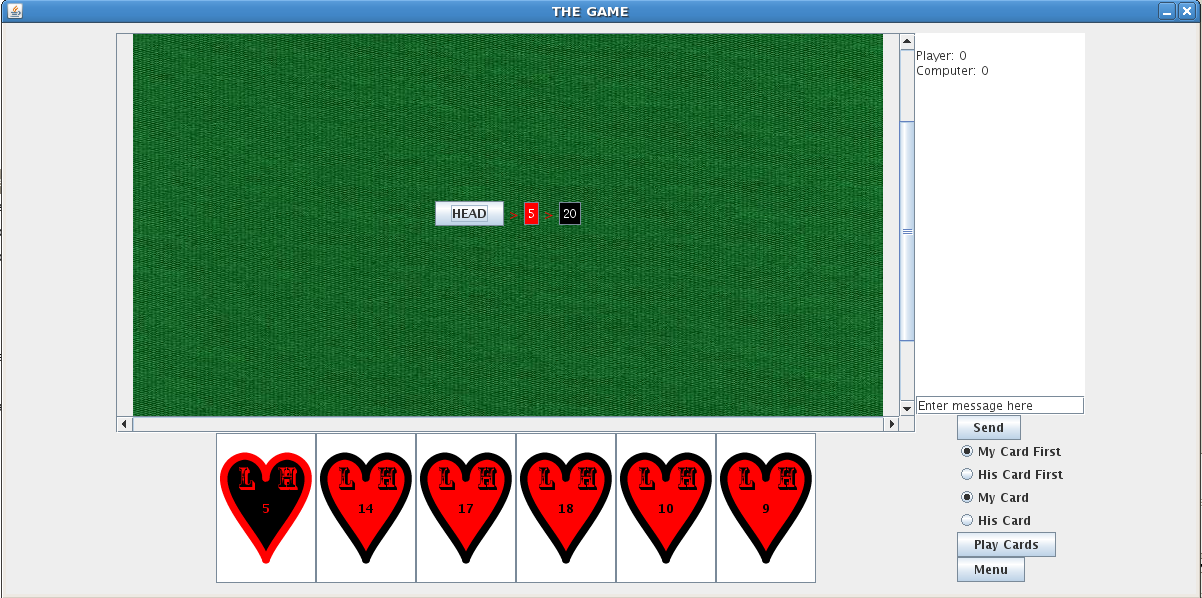
This is still a work in progress but let’s review the production and design process. I set the student a task: to find a way to teach a Computer Science concept using a game. I then gave him a stack of books, a central book as key text, and asked him to go away and come back with some ideas. He then presented a number of good ideas and I selected my prime candidate (which was also his). He then had to present a detailed plan with weekly goals. The project was only six weeks long so we had no time to waste. Over the next few weeks, we developed ideas, refined them and he turned it all into a game, with the assistance of another member of staff who I won’t uniquely identify but, thanks, Claudia!
Let’s look at this in terms of some of the principles I’ve been discussing. We decided to use a game because games are familiar to many people (functional consistency) and the appearance of card games is also something everyone understands (aesthetic consistency). Look at the image. Yes, the cards need some work but it’s got that green baize background we expect and, once the cards are finished, your fingers will naturally be drawn to the cards to select them for playing. I provided a set of nudges to keep the student on the right track, throughout the project, by providing appropriate and directed feedback, as well as controlling the books that he started with and keeping a fairly tight rein on the project until I was sure that he was on the right track. The game itself is full of nudge elements as well to keep the player going – this is a fairly addictive game. I’ve encouraged him to use GUI elements that can only be used in the right way (which is the affordance principle in action), as well as making sure that the system looks the same as every other Java-based game (external consistency). We’re still working on the look and feel of the structures themselves – they need to be consistent with what students have seen before, which is internal consistency in terms of the course context.
Finally, it’s possible for people to easily interrupt and resume games, for me to monitor activity so I can tell if people are undertaking assigned work on playing this game and there also degrees of difficulty involved. This gives us fairly fine-grained control over the performance load of the activity, and greatly reduces the kinematic and cognitive load of playing. Students who are new can choose to, or be expected to, expend less effort to achieve a good result. Expert students can crank up the difficulty and make the task harder. Any student can play it easily, stop playing and then pick it up again later.
I must point out that, while I’ve been heavily involved in the design and mentoring process, what I’ve mostly been doing is guiding a good student and helping him to make good decisions. I’m happy with my contribution but a lot of what I’ve been doing has been helping to organise information for decision making purposes – effectively providing guidance on using the five hat racks.
I hope that this helps you to understand that the design I’m talking about is not choosing Powerpoint templates, although that can be part of it, but is more of a deep-seated commitment to thinking about what we’re doing in order to produce the best work possible. We’re still working on the game and, with any luck we’ll have some versions available for teachers of Data Structures relatively soon.
Moving Down the Road Trying to Lighten My Load: Performance Load (and taking it easy)
Posted: February 26, 2012 Filed under: Education | Tags: design, education, higher education, resources, teaching, teaching approaches, universal principles of design, workload Leave a commentThis is one of the posts of design that, I hope, will help to establish that good design is not just about images, Photoshop and Illustrator! I’m really enjoying the book that all of this is coming from (for those of you who are new to this blog, that’s Universal Principles of Design, Lidwell et al, Revised, 2010). I’ve not had the vocabulary to express a lot of what I’ve learned and that, of course, makes it very hard to communicate. This blogging process has really helped me to tie everything together – but this one is particularly important because it explains why we have to make the effort to manage the load that our students encounter in our courses.
Whenever you’re trying to achieve a goal, you’re going to have to expend effort – in terms of mental and physical activity. When the load gets high, the time it takes to get the job done increases but, regrettably, it’s not just the time it takes that increases – the possibility of error increases and the chances of success starts to drop away. If the load is manageable, then the time reduces, the possibility of error drops and you increase the chance of success. This is the performance load of a task and I suspect that this is one of the key problems in the preparation of a lot of teaching materials and support. There has been an attitude that some of what we teach can’t just be offered – that effort has to expended for the students to value it, or to show that they’re ready for the material. Without going in to too much commentary on this, because I think it’s an attitude that is often used as an excuse rather than a real philosophy, if this is the attitude, that there is an effort barrier, then this has to very carefully managed or the performance load is going to cause an unnecessarily high level of failure.
How easy was it to read that last sentence? What if I’d said “I’m not sure I agree with this, but if there is an effort barrier, we must manage it carefully. Performance load can increase to the point where failure may be inevitable.” Is that easier?
What does load look like for tasks? If it’s moving things around then our muscles come into play, our ability to physically interact with our environment. If it’s thinking then we have to use our cognitive abilities to identify and complete the task. Fundamentally, there are two type of load:
- Kinematic load is a measure of the physical activity involved – strength, number of steps, repetition of action, amount of force involved – to accomplish something. Not many teaching activities will have a strength-related load component (which is good, as it means fewer accessibility concerns) but any time that we introduce an activity that requires physical steps, we’ll reduce the kinematic load if we cut that number of steps down as far as possible. Allowing students to submit their assignments electronically reduces the requirement to print the work, staple it, and physically attend a submission place to submit it. Think about how many things could go wrong in that chain – everything from paper out in the printer, to a water leak destroying all of the paperwork once it’s submitted.
- Cognitive load is how much thinking we’re going to have to do to achieve our goal. How much are you expecting someone to remember? Most people can only hold a few things in their heads at one point – fighting this is pushing water uphill. Keeping your concepts clear and your explanations simple can really help with this. Keeping your presentations simple stops people having to filter out things that aren’t relevant – use consistency in your materials and, if you’re trying to keep everything accessible, consider producing separate sets of material so that information that is useful to one group isn’t considered ‘clutter’ to another. (If you want a good example, look at subtitled movies. One subtitle is okay, but I’ve seen movies subtitled in Chinese characters, English and Tamil simultaneously. It leaves about half the screen for the content and makes the film hard to watch!)
However you reduce performance load, you have to remember that there will be a minimum load – assuming that you don’t change the requirements of the task. This can be easy to get wrong. Abuse of load reduction can be prevalent in students. If you consider plagiarism, this used to much harder than it is now that we have networked computers and the Internet. The cognitive load reduction of copying was still quite high, but it required an equivalent amount of kinematic load because of the requirement to rewrite the work (or type it in again from a print-out). So, just being aware of load reduction is only part of the battle – how we reduce performance load has to be considered while still understanding that we can’t reduce the requirements of the task itself.
I think this is what people are always suspicious of when we talk about design – that somehow considering design will demean, cheapen or over-simplify the task. I agree that this is something we should think about, but I certainly don’t think that it’s inevitable.
Consistency: Doing the Same Thing Can Be Useful!
Posted: February 25, 2012 Filed under: Education | Tags: education, higher education, principles of design, resources, teaching, teaching approaches, universal principles of design 9 CommentsAnother day, another design post, but this post is not going to be that huge because I’ve already shown you several examples of what I’m talking about today. Systems are more usable when similar parts are expressed in similar ways – that’s why OS X’s steady convergence with iOS is probably going to bring more people to both platforms than lose grumpy people who don’t like the ‘new’ interface. If one Apple platform allows you the familiarity to use any other, the consistency will make people happy.
And that’s today’s principle for discussion: consistency. Again, it’s from Universal Principles of Design, Lidwell et al, Revised, 2010. People will learn new things more quickly, focus on the right things and be able to transfer their knowledge more easily if the system is consistent. There are four basic considerations and I’m going to show them to you in exactly the same format that I’ve been using for all of these posts. Well, I’ve been trying to be consistent. It’s possibly been similar enough that when you see bold italic you think ‘design principle’ and when you see a bulleted list with leading bolds you think ‘aspect’ or ‘facet’. Sorry for the priming but I’m trying to make a point here 🙂 Anyway, here are the four kinds of consistency.
- Aesthetic consistency: Is everything similar or the same in terms of style and appearance? I adopted a standard template for my lectures in one course, with strong visual indicators of transitions to different modes. As a result, students always knew which lecture they were in and what was expected of them in terms of participation and activity.
- Functional consistency: This is consistency in what things mean and how they’re used. How do students hand-in their work – do they always do the same things to make a hand-in work? Does button X always produce result Y? We can also use pre-existing knowledge of function to our benefit and save ourselves the effort of having to teach someone how to approach our work, from scratch. Use existing knowledge of functional actions, and their associated symbols, to make your work easier. (Here’s a thinking point: the save Icon for many systems is an image of a 3.5″ floppy disk. I polled my students and over 70% of them had only seen the disk in this context. What does ‘save’ look like in a cloud-based context?)
- Internal consistency: The elements inside your system or set of materials should be consistent with each other. Once you’ve learned one part of the system, the others won’t surprise you by being completely different. This also makes people believe that you have actually bothered to design a system, rather than stitch it together out of other, inconsistent, parts.
- External consistency: How do your objects, materials or systems work inside the overall environment of your students? This is a tricky one because innovation sometimes means that you’re out of step (let’s say ahead of step) with other people. Just because nobody else uses lecture recordings and you do isn’t a violation of external consistency. However, there will be core design standards across most areas (to at least a degree) and adherence to these is important or it’s easy for students to get confused. If you are diverging from this standard, you must take the additional effort to address the inconsistency to reduce confusion.
As Lidwell notes, aesthetic and functional consistency should be considered in almost everything we do – aesthetic consistency allows us to produce a distinct idea, and functional consistency makes it easier for people to learn. The other requirements drive the need for internal and external specifications that work and are observed. All we’re really doing here is trying to make it easier for people to learn, and that should never really be that controversial.
(Wait, what was that about priming? And haven’t you mentioned that before? Yes, I have. Further discussion is coming soon.)
If you’ve got five thinking hats, I’ve got five hat racks for you!
Posted: February 24, 2012 Filed under: Education | Tags: education, higher education, principles of design, resources, teaching, teaching approaches, universal principles of design Leave a commentThis isn’t actually a post about Edward de Bono’s Five Thinking Hats, although that’s a fascinating book to describe adopting different modes for different cognitive activities. Once we get out of design week, I hope to come back to this. Part of designing any materials or object is to ensure that the information it represents or makes available is organised in a way that people can use. No textbook of any value is organised along Dadaist principles – semi-random and deliberately nonsensical organisation – they all use well-established idioms like chapters, headings and indexes (indices?) to organise the information and make it more accessible. One of the things I like about the reference I’m using (Universal Principles of Design, Lidwell et all, Revised, 2010) is that all of the design principles are organised alphabetically but, wherever you start, there is a see also section down the bottom that takes you to a conceptually linked entry. You can then, of course, use alphabetical search or the index to then locate it.
According to the Five Thinking Hats principle, there are a limited number of organisational strategies that you can use to organise information. These can be used for just about any application.
- Category: We can organise things by their similarity or relatedness. In teaching materials for Computer Science, we often group similar programming concepts together – loops with loops, conditionals with conditionals. Most texts are going to use categorisation to minimise the cognitive load of context switching from one area to another, and having to remember what you read before. Will your students try to search out things by category? Probably – that’s how their access to your college’s web site handles their enrolment details, most likely, by grouping all relevant courses into a common category. But why not tag all materials relevant to Assignment 2 under a search item ‘stuff for Assignment 2’? That’s an easy use of categorisation.
- Time: Lecture recordings are a natural fit for time-based organisation because they present a set of events that are dependent upon each other and evolve over time. Yes, you could put them into a folder sorted by lecture name but, unless your lectures are really not connected at all, no-one is going to thank you for that. Schedules and historical timelines are also fairly obvious candidates for temporal strategies.
- Location: Grouping things by their geographical or spatial reference helps people successfully orient themselves to work with your materials. While it may seem that this is of little use to people who aren’t teaching geography, what about making a clear distinction between things that students need for lectures and those that they need for tutorials or practicals? Wherever your students are – what do they need when they get there? Is it clearly identified wherever your materials are or do they need to search through everything to find out what they need?
- Alphabet: You didn’t think I’d leave this one out did you? The alphabet is always a good fallback when people will be using your work as a reference and not reading it sequentially, or you want to be able to leap around the work efficiently. If you can’t think of any other way – go for the alphabet. Of course, this assumes that whoever reading your work is familiar with your alphabet. This must be a consideration if you’re working with people who have your language as their second, or third, language.
- Continuum: Some things can be grouped by their magnitude – students are all familiar with this if you’ve ever posted a list of grades from top to bottom, rather than by ID. Best to worst, highest to lowest, largest to smallest. This kind of organisation can be handy for electronic materials where you have a variety of recording types and some produce larger files. Providing a list to students can be organised by type or by size. If you know that students prefer the smaller, faster to download, ones, sort to put them up there first. If you’re comparing things across one key measure, think about how you could group along that measure to make the information easier to access.
Now, this may explain why I try to put these blog posts into some sort of context by talking about ‘opinion’ and ‘design’ as weekly themes. The posts are already ordered by time but I add a categorical overview because the actual categories and tags are used for people finding these posts, not necessarily for people who are already reading my blog. This loose organisation, that I usually make at least an oblique reference to at the start of each post, helps you to categorise the information in the post. How do you group your ideas and materials?
Yes, you can! (Sorry, Mr President)
Posted: February 23, 2012 Filed under: Education, Opinion | Tags: design, education, higher education, reflection, teaching, teaching approaches, universal principles of design Leave a commentI put in a long post yesterday and today’s reward is that this post is short. I want to remind you all that you don’t have to be some sort of amazing educational designer to bring good design into your work. When most people think ‘design’ they think of graphic design, high-concept art, artistic ability and lots of words that aren’t in their standard vocabulary. I hope that, over the last three days, you’ve realised that we’re all using good design principles all the time – everywhere – and that’s it a matter of being aware of what we’re doing, so we can re-use those principles elsewhere. I’m certainly no expert but I can explain things fairly well and I like to bring new vocabularies to new audiences. I have a secret theory that most of the problems we have stem from people not being able to communicate and express themselves – maybe not all problems, but certainly a lot of those that lead to disengagement and frustration among our students.
One of the aspects of President Obama’s campaign that was both praised and ridiculed, depending upon which side of politics you found yourself, was the use of simple messages and clear design to make it easy for people to identify the campaign and associate with it. The imagery is simple and powerful. The logo includes references to the President’s initial (O), patriotic symbols and sunrise – a new beginning. That kind of simplicity and power takes some serious work and that’s where professional designers make their money. (I’ve deliberately not linked or included the logo here. I’m aware of the political divide in the US and don’t want people to think I’m advocating one political party or another – the title of this post is probably enough that I’ll get some interesting comments. You can easily find the logo for yourself by searching for Obama logo.)
But that’s not what we’re doing. We’re just trying to make our teaching more accessible, our materials easier to use and our students more knowledgable. By considering things we may not have considered, we can reduce problems. We can make our lecture notes available in ways we hadn’t thought of before. We can make a difference that assists our students in engaging with us and what we’re trying to teach them.
Electing a president? That’s probably beyond you. Looking at some of the things that I’ve been talking about and possibly helping a student learn from you? Yes, you can!

 Nick Falkner